---
title: Setup Studio Staff Payrolls
description: Walks through configuring staff payroll
---
[Skip to content](https://support.vibefam.com/add-studio-staff-0#main-content)
English
Show submenu for translations
[Request for Support](https://support.vibefam.com/kb-tickets/new?hsLang=en)
[](https://support.vibefam.com/?hsLang=en)
- Topics
Show submenu for Topics
- [Getting started](https://support.vibefam.com/support-knowledge/getting-started)
- [Classes, Courses & Appointments](https://support.vibefam.com/support-knowledge/classes-courses-appointments)
- [Packages](https://support.vibefam.com/support-knowledge/packages-payments#packages)
- [Payments](https://support.vibefam.com/support-knowledge/packages-payments#payments)
- [Booking & Scheduling](https://support.vibefam.com/support-knowledge/booking-scheduling)
- [Staff & Instructors](https://support.vibefam.com/support-knowledge/staff-instructors)
- [Members & Family Accounts](https://support.vibefam.com/support-knowledge/members-family-accounts)
- [Notifications & Marketing](https://support.vibefam.com/support-knowledge/notifications-marketing)
- [Integrations & Advanced Features](https://support.vibefam.com/support-knowledge/integrations-advanced-features)
- [Reports & Insights](https://support.vibefam.com/support-knowledge/reports-insights)
- [Studio FAQs](https://support.vibefam.com/studio-owners-faq)
- [Schedule a call with us](https://meetings-na2.hubspot.com/vibefam-support/customer-success-meeting-scheduler)
Open main navigation
Close main navigation
- Topics
Show submenu for Topics
- [Getting started](https://support.vibefam.com/support-knowledge/getting-started)
- [Classes, Courses & Appointments](https://support.vibefam.com/support-knowledge/classes-courses-appointments)
- [Packages](https://support.vibefam.com/support-knowledge/packages-payments#packages)
- [Payments](https://support.vibefam.com/support-knowledge/packages-payments#payments)
- [Booking & Scheduling](https://support.vibefam.com/support-knowledge/booking-scheduling)
- [Staff & Instructors](https://support.vibefam.com/support-knowledge/staff-instructors)
- [Members & Family Accounts](https://support.vibefam.com/support-knowledge/members-family-accounts)
- [Notifications & Marketing](https://support.vibefam.com/support-knowledge/notifications-marketing)
- [Integrations & Advanced Features](https://support.vibefam.com/support-knowledge/integrations-advanced-features)
- [Reports & Insights](https://support.vibefam.com/support-knowledge/reports-insights)
- [Studio FAQs](https://support.vibefam.com/studio-owners-faq)
- [Schedule a call with us](https://meetings-na2.hubspot.com/vibefam-support/customer-success-meeting-scheduler)
- English
Show submenu for translations
- [Request for Support](https://support.vibefam.com/kb-tickets/new)
How can we help you?
- There are no suggestions because the search field is empty.
1. [Support Knowledge Centre](https://support.vibefam.com/?hsLang=en)
2. [Staff & Instructors](https://support.vibefam.com/staff-instructors?hsLang=en)
# Setup Studio Staff Payrolls
## This article walks through setting up staff payroll
Navigate to **Staff** in the main menu.
### **Set up staff payroll**
Vibefam calculates staff payroll for you, so you don't have to tabulate it by hand.
In the staff list, click the **settings** icon on the right of a staff member's row to configure their payroll.
Studios on the Professional plan can access all payroll systems. On other plans, you can still use the payroll system on the **Flat** rate.
#### **Start with a base system**
**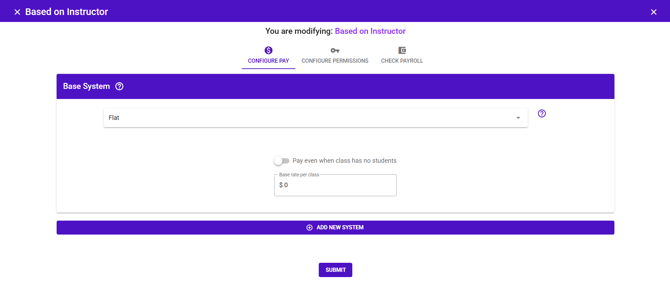**
A **base system** is the payroll structure that applies to every class the instructor teaches.
- If your instructor is paid one rate for all sessions, a base system is all you need.
- *Example: Coach Gary is paid $100 for every class he teaches.*
#### **Add variability where you need it**
**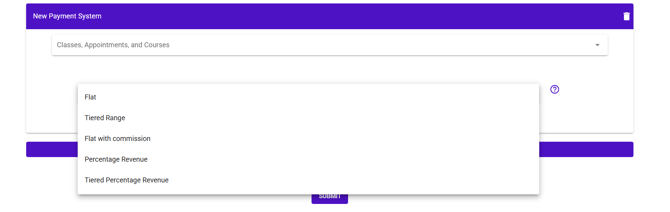**
To pay a different rate for certain sessions, click **Add New System** to add another layer.
- *Example: a special rate for Coach Gary's personal training sessions, on top of his base class rate.*
Each system applies to a chosen set of **Classes, Appointments, and Courses**, so you can mix structures for the same instructor.
#### **The five payroll systems**
There are five system types, fully customisable on the Professional plan. The right one depends on whether you want to pay a fixed amount or a share of revenue, and whether pay should rise with attendance.
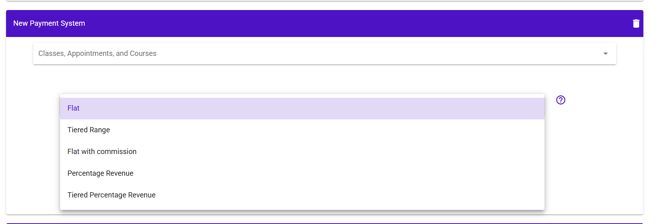
1. **Flat** — a fixed amount per session, regardless of attendance. The simplest option.
1. *Example: $100 for every class taught.*
2. **Best for:** predictable costs, or instructors on a set rate.
2. **Tiered Range** — a fixed amount that steps up in bands as attendance grows.
1. *Example: 1–3 students → $30, 4–7 students → $50, 8+ students → $80.*
2. **Best f****or:** encouraging instructors to fill classes. Note the incentive is "lumpy" — once an instructor reaches a band, there's no gain until the next band begins.
3. **Flat with commission** — a base amount, plus a per-head bonus above a threshold.
1. *Example: $50 for up to 5 students, then $10 for each additional student. A class of 7 pays $70.*
2. **Best for:** a smoother incentive than Tiered Range — every extra attendee adds pay, so instructors are motivated to chase each additional sign-up.
4. **Percentage Revenue** — a share of the actual revenue the class earns.
1. *Example: 50% commission on a class earning $100 pays the instructor $50.*
2. **Best for:** protecting your margin when attendance is low, since pay scales with revenue rather than being fixed. A good fit for newer studios or tighter cash flow.
5. **Tiered Percentage Revenue** — like Tiered Range, but each band pays a percentage of revenue instead of a fixed amount.
1. *Example: 1–3 students → 20%, 4–7 students → 30%, 8+ students → 50%.*
2. **Best f****or:** rewarding attendance while keeping your risk tied to revenue rather than absolute figures.
> **Attendance-based systems count actual attendance.** Make sure your instructors or reception are checking members in, or the calculation won't reflect who really showed up.
***We've written a fuller guide with worked examples of each structure: [Different ways to pay your freelance instructors](https://vibefam.com/different-ways-to-pay-your-freelance-instructors/). ***
#### **Check and export**
- Click **Check Payroll** to tabulate an instructor's pay.
- Download the report as a **CSV** to review or share it.
- [Getting started](https://support.vibefam.com/getting-started?hsLang=en)
- [Classes, Courses & Appointments](https://support.vibefam.com/classes-courses-appointments?hsLang=en)
- [Packages & Payments](https://support.vibefam.com/packages-payments?hsLang=en#main-content)
- [Packages](https://support.vibefam.com/packages-payments?hsLang=en#packages)
- [Payments](https://support.vibefam.com/packages-payments?hsLang=en#payments)
- [Booking & Scheduling](https://support.vibefam.com/booking-scheduling?hsLang=en)
- [Staff & Instructors](https://support.vibefam.com/staff-instructors?hsLang=en)
- [Members & Family Accounts](https://support.vibefam.com/members-family-accounts?hsLang=en)
- [Notifications & Marketing](https://support.vibefam.com/notifications-marketing?hsLang=en)
- [Integrations & Advanced Features](https://support.vibefam.com/integrations-advanced-features?hsLang=en)
- [Reports & Insights](https://support.vibefam.com/reports-insights?hsLang=en)
[](https://vibefam.com/)
Fitness management system for top fitness businesses
[mailto:help@vibefam.com](mailto:help@vibefam.com)
Copyright © 2026, Vibefam