---
title: Custom Charge Members
description: A Custom Charge lets you bill a member for a one-off amount that isn't a package, course, or piece of merchandise — a late fee, a workshop, an event, an equipment charge, a private session, or anything else outside your normal offerings.
---
[Skip to content](https://support.vibefam.com/custom-charge-members#main-content)
English
Show submenu for translations
[Request for Support](https://support.vibefam.com/kb-tickets/new?hsLang=en)
[](https://support.vibefam.com/?hsLang=en)
- Topics
Show submenu for Topics
- [Getting started](https://support.vibefam.com/support-knowledge/getting-started)
- [Classes, Courses & Appointments](https://support.vibefam.com/support-knowledge/classes-courses-appointments)
- [Packages](https://support.vibefam.com/support-knowledge/packages-payments#packages)
- [Payments](https://support.vibefam.com/support-knowledge/packages-payments#payments)
- [Booking & Scheduling](https://support.vibefam.com/support-knowledge/booking-scheduling)
- [Staff & Instructors](https://support.vibefam.com/support-knowledge/staff-instructors)
- [Members & Family Accounts](https://support.vibefam.com/support-knowledge/members-family-accounts)
- [Notifications & Marketing](https://support.vibefam.com/support-knowledge/notifications-marketing)
- [Integrations & Advanced Features](https://support.vibefam.com/support-knowledge/integrations-advanced-features)
- [Reports & Insights](https://support.vibefam.com/support-knowledge/reports-insights)
- [Studio FAQs](https://support.vibefam.com/studio-owners-faq)
- [Schedule a call with us](https://meetings-na2.hubspot.com/vibefam-support/customer-success-meeting-scheduler)
Open main navigation
Close main navigation
- Topics
Show submenu for Topics
- [Getting started](https://support.vibefam.com/support-knowledge/getting-started)
- [Classes, Courses & Appointments](https://support.vibefam.com/support-knowledge/classes-courses-appointments)
- [Packages](https://support.vibefam.com/support-knowledge/packages-payments#packages)
- [Payments](https://support.vibefam.com/support-knowledge/packages-payments#payments)
- [Booking & Scheduling](https://support.vibefam.com/support-knowledge/booking-scheduling)
- [Staff & Instructors](https://support.vibefam.com/support-knowledge/staff-instructors)
- [Members & Family Accounts](https://support.vibefam.com/support-knowledge/members-family-accounts)
- [Notifications & Marketing](https://support.vibefam.com/support-knowledge/notifications-marketing)
- [Integrations & Advanced Features](https://support.vibefam.com/support-knowledge/integrations-advanced-features)
- [Reports & Insights](https://support.vibefam.com/support-knowledge/reports-insights)
- [Studio FAQs](https://support.vibefam.com/studio-owners-faq)
- [Schedule a call with us](https://meetings-na2.hubspot.com/vibefam-support/customer-success-meeting-scheduler)
- English
Show submenu for translations
- [Request for Support](https://support.vibefam.com/kb-tickets/new)
How can we help you?
- There are no suggestions because the search field is empty.
1. [Support Knowledge Centre](https://support.vibefam.com/?hsLang=en)
2. [Packages & Payments](https://support.vibefam.com/packages-payments?hsLang=en)
3. [Payments](https://support.vibefam.com/packages-payments?hsLang=en#payments)
# Custom Charge Members
A **Custom Charge** lets you bill a member for a one-off amount that isn't a package, course, or piece of merchandise — a late fee, a workshop, an event, an equipment charge, a private session, or anything else outside your normal offerings. You can record it as a cash/offline payment, or charge the member's saved card.
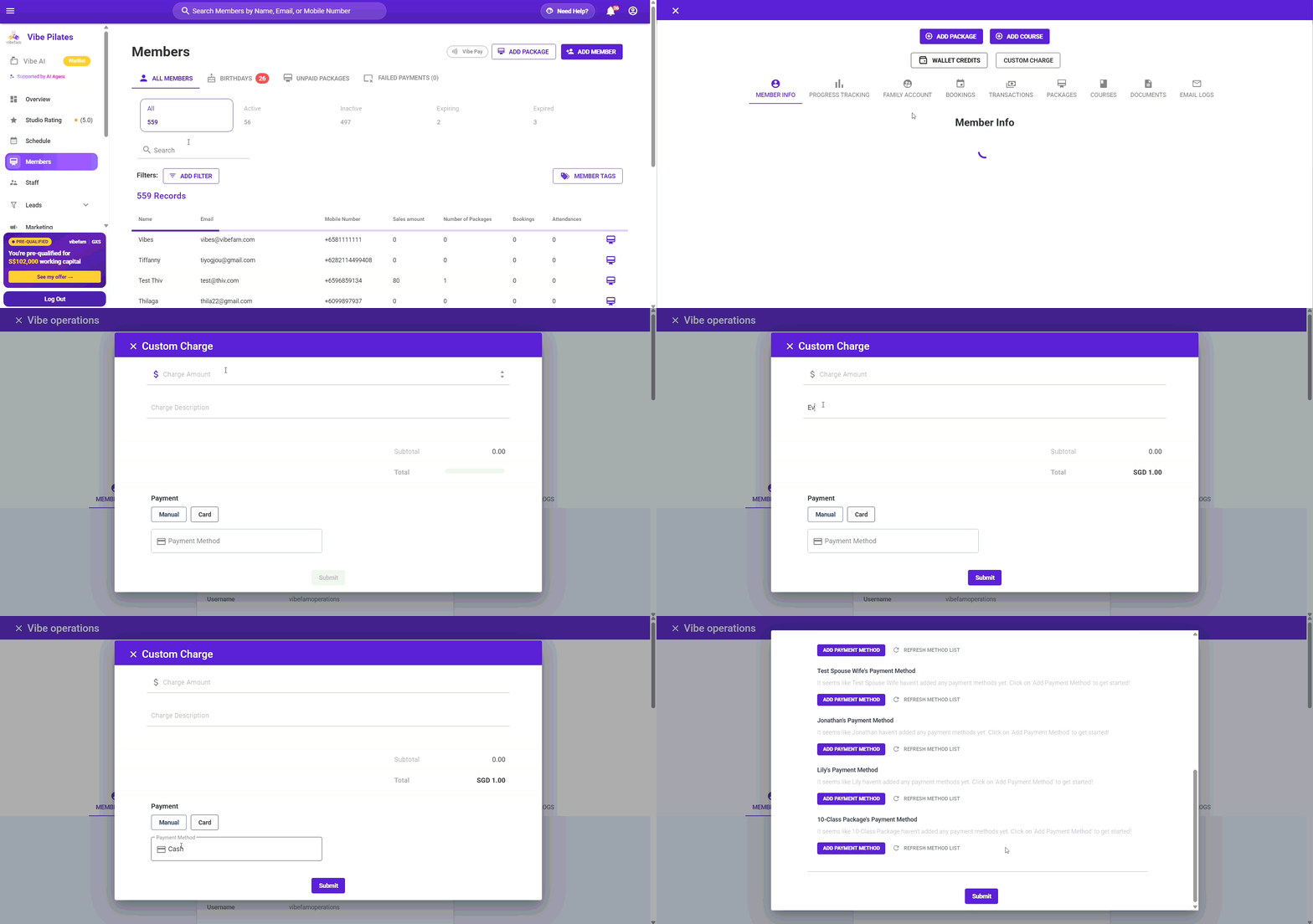
Navigate to **Members**, then open the member's profile.
---
### **Creating a custom charge**
1. Go to **Members** and open the profile of the member you want to charge.
2. Click **Custom Charge** (next to Add Package, Add Course, and Wallet Credits).
3. Enter the **Charge Amount**.
4. Add a **Charge Description** — e.g. *Workshop*, *Event*, *Late fee*. This is what identifies the charge on the member's record, so make it clear.
5. The **Subtotal** and **Total** update as you type, in your studio's currency.
6. Choose how it's paid (below).
7. Click **Submit**.
---
### **Manual vs. Card**
Under **Payment**, choose how the charge is settled:
#### Manual
Use **Manual** to record a payment the member makes outside Vibefam — for example **cash** at the front desk, or a bank transfer.
- Select the **Payment Method** (e.g. Cash).
- Vibefam records the charge against the member; it doesn't move any money itself.
Manual is for keeping your records complete when a member pays you directly.
#### **Card**
Use **Card** to charge the member's **saved card** through Vibefam.
- You'll see the payment methods saved on the member's profile (and their family sub-accounts, if any).
- Select the card to charge.
> **The member needs a saved card for this.** If the profile shows *"…haven't added any payment methods yet,"* there's no card to charge. Click **Add Payment Method** to add one first, or use **Manual** if they're paying another way.
---
### **Where the charge appears**
Once submitted, the custom charge is recorded on the member's profile under the **Transactions** tab, and appears in your studio's sales records like any other payment.
***Limitation:*** Currently receipt generation is not supported for this feature.
---
### **Tips**
- **Write a clear description.** *"Custom charge"* on a receipt confuses members; *"Reformer workshop – 12 Aug"* doesn't. The description is what they'll see and what you'll recognise later.
- **Manual doesn't collect money** — it only records that a payment happened. Make sure you've actually received the cash or transfer before recording it.
- **Card needs consent and a saved card.** Only charge a card the member has agreed to be charged, and remember the card must already be saved to their profile.
- **For refunds or corrections**, check the member's Transactions tab rather than creating a second offsetting charge.
- [Getting started](https://support.vibefam.com/getting-started?hsLang=en)
- [Classes, Courses & Appointments](https://support.vibefam.com/classes-courses-appointments?hsLang=en)
- [Packages & Payments](https://support.vibefam.com/packages-payments?hsLang=en#main-content)
- [Packages](https://support.vibefam.com/packages-payments?hsLang=en#packages)
- [Payments](https://support.vibefam.com/packages-payments?hsLang=en#payments)
- [Booking & Scheduling](https://support.vibefam.com/booking-scheduling?hsLang=en)
- [Staff & Instructors](https://support.vibefam.com/staff-instructors?hsLang=en)
- [Members & Family Accounts](https://support.vibefam.com/members-family-accounts?hsLang=en)
- [Notifications & Marketing](https://support.vibefam.com/notifications-marketing?hsLang=en)
- [Integrations & Advanced Features](https://support.vibefam.com/integrations-advanced-features?hsLang=en)
- [Reports & Insights](https://support.vibefam.com/reports-insights?hsLang=en)
[](https://vibefam.com/)
Fitness management system for top fitness businesses
[mailto:help@vibefam.com](mailto:help@vibefam.com)
Copyright © 2026, Vibefam