---
title: Customize Member Receipts
description: Every member receives a receipt after making a purchase. You can add your own text to that receipt — a thank-you note, a reminder of your policies, or details your members often ask about.
---
[Skip to content](https://support.vibefam.com/customize-member-receipts#main-content)
English
Show submenu for translations
[Request for Support](https://support.vibefam.com/kb-tickets/new?hsLang=en)
[](https://support.vibefam.com/?hsLang=en)
- Topics
Show submenu for Topics
- [Getting started](https://support.vibefam.com/support-knowledge/getting-started)
- [Classes, Courses & Appointments](https://support.vibefam.com/support-knowledge/classes-courses-appointments)
- [Packages](https://support.vibefam.com/support-knowledge/packages-payments#packages)
- [Payments](https://support.vibefam.com/support-knowledge/packages-payments#payments)
- [Booking & Scheduling](https://support.vibefam.com/support-knowledge/booking-scheduling)
- [Staff & Instructors](https://support.vibefam.com/support-knowledge/staff-instructors)
- [Members & Family Accounts](https://support.vibefam.com/support-knowledge/members-family-accounts)
- [Notifications & Marketing](https://support.vibefam.com/support-knowledge/notifications-marketing)
- [Integrations & Advanced Features](https://support.vibefam.com/support-knowledge/integrations-advanced-features)
- [Reports & Insights](https://support.vibefam.com/support-knowledge/reports-insights)
- [Studio FAQs](https://support.vibefam.com/studio-owners-faq)
- [Schedule a call with us](https://meetings-na2.hubspot.com/vibefam-support/customer-success-meeting-scheduler)
Open main navigation
Close main navigation
- Topics
Show submenu for Topics
- [Getting started](https://support.vibefam.com/support-knowledge/getting-started)
- [Classes, Courses & Appointments](https://support.vibefam.com/support-knowledge/classes-courses-appointments)
- [Packages](https://support.vibefam.com/support-knowledge/packages-payments#packages)
- [Payments](https://support.vibefam.com/support-knowledge/packages-payments#payments)
- [Booking & Scheduling](https://support.vibefam.com/support-knowledge/booking-scheduling)
- [Staff & Instructors](https://support.vibefam.com/support-knowledge/staff-instructors)
- [Members & Family Accounts](https://support.vibefam.com/support-knowledge/members-family-accounts)
- [Notifications & Marketing](https://support.vibefam.com/support-knowledge/notifications-marketing)
- [Integrations & Advanced Features](https://support.vibefam.com/support-knowledge/integrations-advanced-features)
- [Reports & Insights](https://support.vibefam.com/support-knowledge/reports-insights)
- [Studio FAQs](https://support.vibefam.com/studio-owners-faq)
- [Schedule a call with us](https://meetings-na2.hubspot.com/vibefam-support/customer-success-meeting-scheduler)
- English
Show submenu for translations
- [Request for Support](https://support.vibefam.com/kb-tickets/new)
How can we help you?
- There are no suggestions because the search field is empty.
1. [Support Knowledge Centre](https://support.vibefam.com/?hsLang=en)
2. [Getting started](https://support.vibefam.com/getting-started?hsLang=en)
# Customize Member Receipts
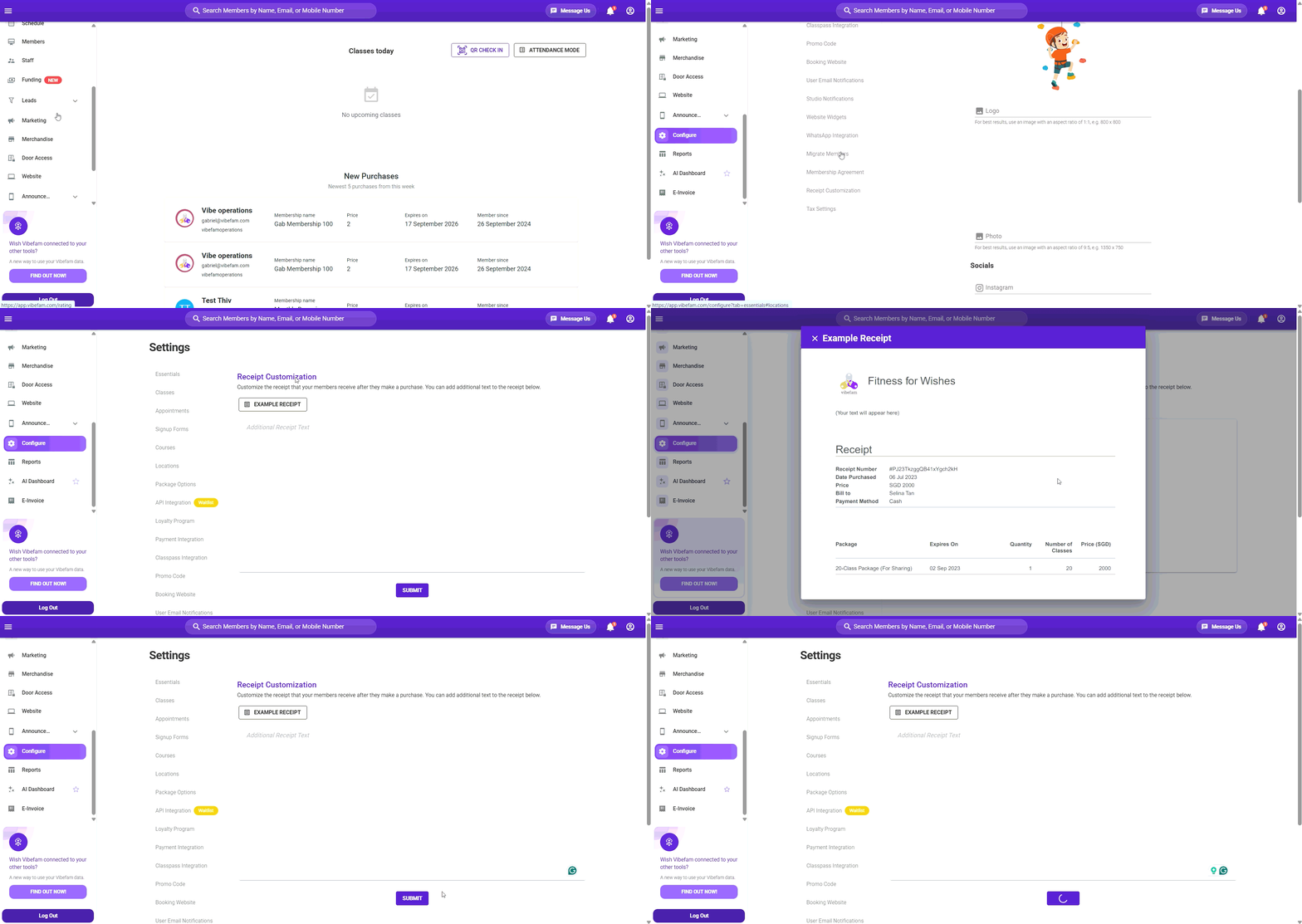
Every member receives a receipt after making a purchase. You can add your own text to that receipt — a thank-you note, a reminder of your policies, or details your members often ask about.
Navigate to **Configure → Receipt Customization**.
---
### **What you can and can't change**
**You can** add your own text to the receipt.
**You can't** change the receipt template itself. The layout, and the purchase details Vibefam fills in automatically — package name, price, date, member details — are fixed. Your text is added alongside them.
Think of it as a free-text space on a standard receipt, rather than a receipt builder.
---
### **Adding your text**
1. Go to **Configure → Receipt Customization**.
2. Enter the text you want to appear on your members' receipts.
3. Click **Submit** to save.
> Changes apply to receipts issued from that point onward. Receipts already sent to members are not updated.
---
### **What to put in it**
| Use it for | Example |
| --- | --- |
| **A thank-you note** | A short line of appreciation makes an automated email feel like it came from your studio. |
| **Next steps** | Tell members how to book their first class — the most common question after a purchase. |
| **Policy reminders** | Cancellation windows, late arrival rules, or expiry terms, so members see them without digging. |
| **Contact details** | Where to reach you if something's wrong with the purchase. |
| **Business details** | Your registered business name, address, or registration number, if your members need them for expense claims. |
| **Social handles** | A light prompt to follow your studio. |
Keep it short. A receipt is a transactional email — a few lines are read, several paragraphs are not.
**If you need tax or invoice details on your receipts**, check **Configure → Tax Settings** first. This free-text field is not a substitute for proper tax configuration, and adding a tax number as plain text may not meet invoicing requirements in your market.
- [Getting started](https://support.vibefam.com/getting-started?hsLang=en)
- [Classes, Courses & Appointments](https://support.vibefam.com/classes-courses-appointments?hsLang=en)
- [Packages & Payments](https://support.vibefam.com/packages-payments?hsLang=en#main-content)
- [Packages](https://support.vibefam.com/packages-payments?hsLang=en#packages)
- [Payments](https://support.vibefam.com/packages-payments?hsLang=en#payments)
- [Booking & Scheduling](https://support.vibefam.com/booking-scheduling?hsLang=en)
- [Staff & Instructors](https://support.vibefam.com/staff-instructors?hsLang=en)
- [Members & Family Accounts](https://support.vibefam.com/members-family-accounts?hsLang=en)
- [Notifications & Marketing](https://support.vibefam.com/notifications-marketing?hsLang=en)
- [Integrations & Advanced Features](https://support.vibefam.com/integrations-advanced-features?hsLang=en)
- [Reports & Insights](https://support.vibefam.com/reports-insights?hsLang=en)
[](https://vibefam.com/)
Fitness management system for top fitness businesses
[mailto:help@vibefam.com](mailto:help@vibefam.com)
Copyright © 2026, Vibefam