---
title: How to set up Class Type, Course Type and Appointment Type
description: Setting up Class Type, Course Type, and Appointment Type
---
[Skip to content](https://support.vibefam.com/how-to-set-up-classes-and-appointments#main-content)
English
Show submenu for translations
[Request for Support](https://support.vibefam.com/kb-tickets/new?hsLang=en)
[](https://support.vibefam.com/?hsLang=en)
- Topics
Show submenu for Topics
- [Getting started](https://support.vibefam.com/support-knowledge/getting-started)
- [Classes, Courses & Appointments](https://support.vibefam.com/support-knowledge/classes-courses-appointments)
- [Packages](https://support.vibefam.com/support-knowledge/packages-payments#packages)
- [Payments](https://support.vibefam.com/support-knowledge/packages-payments#payments)
- [Booking & Scheduling](https://support.vibefam.com/support-knowledge/booking-scheduling)
- [Staff & Instructors](https://support.vibefam.com/support-knowledge/staff-instructors)
- [Members & Family Accounts](https://support.vibefam.com/support-knowledge/members-family-accounts)
- [Notifications & Marketing](https://support.vibefam.com/support-knowledge/notifications-marketing)
- [Integrations & Advanced Features](https://support.vibefam.com/support-knowledge/integrations-advanced-features)
- [Reports & Insights](https://support.vibefam.com/support-knowledge/reports-insights)
- [Studio FAQs](https://support.vibefam.com/studio-owners-faq)
- [Schedule a call with us](https://meetings-na2.hubspot.com/vibefam-support/customer-success-meeting-scheduler)
Open main navigation
Close main navigation
- Topics
Show submenu for Topics
- [Getting started](https://support.vibefam.com/support-knowledge/getting-started)
- [Classes, Courses & Appointments](https://support.vibefam.com/support-knowledge/classes-courses-appointments)
- [Packages](https://support.vibefam.com/support-knowledge/packages-payments#packages)
- [Payments](https://support.vibefam.com/support-knowledge/packages-payments#payments)
- [Booking & Scheduling](https://support.vibefam.com/support-knowledge/booking-scheduling)
- [Staff & Instructors](https://support.vibefam.com/support-knowledge/staff-instructors)
- [Members & Family Accounts](https://support.vibefam.com/support-knowledge/members-family-accounts)
- [Notifications & Marketing](https://support.vibefam.com/support-knowledge/notifications-marketing)
- [Integrations & Advanced Features](https://support.vibefam.com/support-knowledge/integrations-advanced-features)
- [Reports & Insights](https://support.vibefam.com/support-knowledge/reports-insights)
- [Studio FAQs](https://support.vibefam.com/studio-owners-faq)
- [Schedule a call with us](https://meetings-na2.hubspot.com/vibefam-support/customer-success-meeting-scheduler)
- English
Show submenu for translations
- [Request for Support](https://support.vibefam.com/kb-tickets/new)
How can we help you?
- There are no suggestions because the search field is empty.
1. [Support Knowledge Centre](https://support.vibefam.com/?hsLang=en)
2. [Classes, Courses & Appointments](https://support.vibefam.com/classes-courses-appointments?hsLang=en)
# How to set up Class Type, Course Type and Appointment Type
## Before you can start configuring your class, course or appointment. You will need to first start by giving it a name.
### **Classes**
**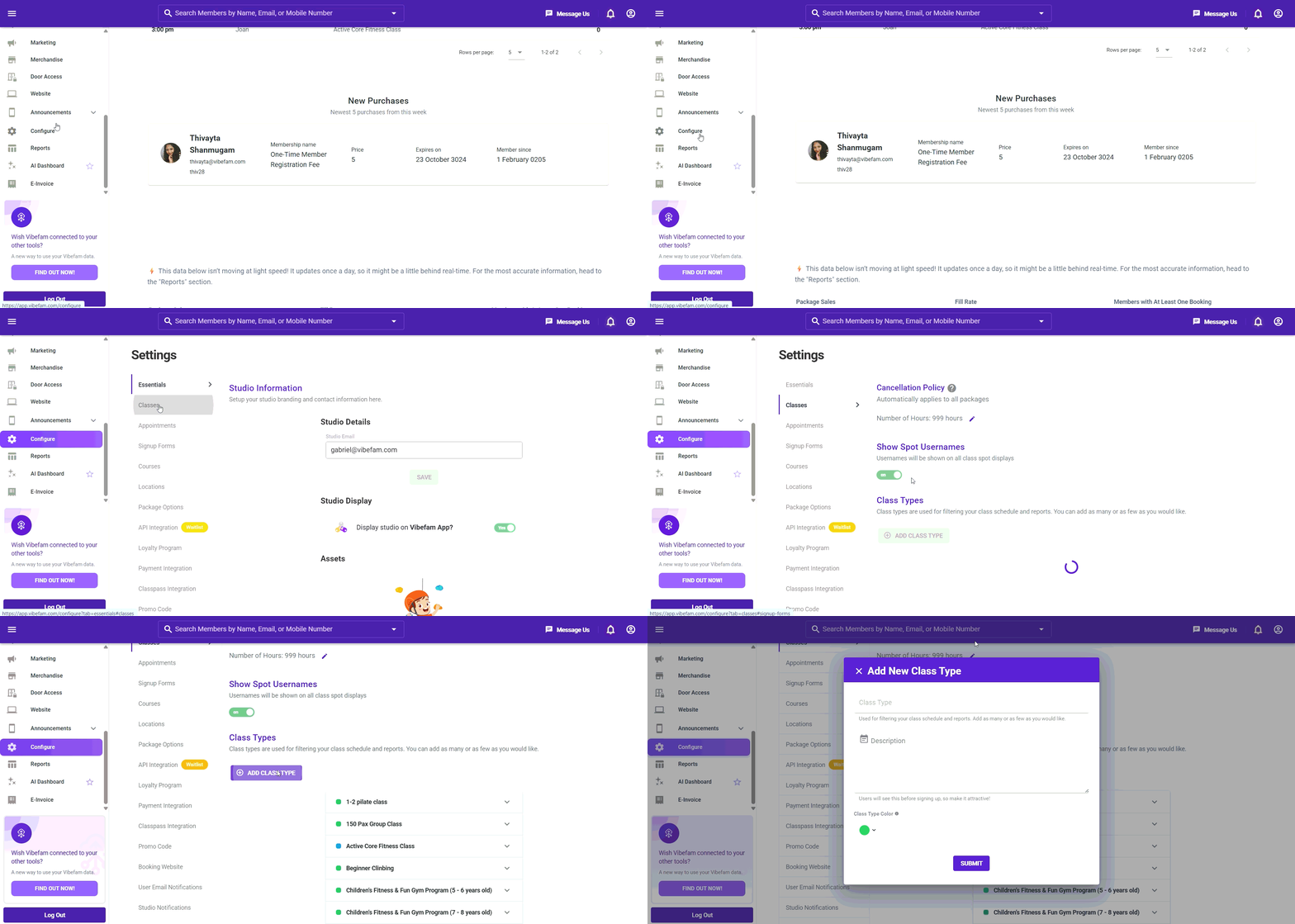**
- Go to "**Configure**" -\> Navigate to **Classes** tab
- There is a default HIIT workout class type setup for your reference. Edit it to your preferred class type
- Select **Add Class Type** to add the class types offered at your studio. Class types are used to filter your class schedule and reports. Add as many types as your studio requires.
- Note: Class Description **cannot** be empty
### **Appointments**
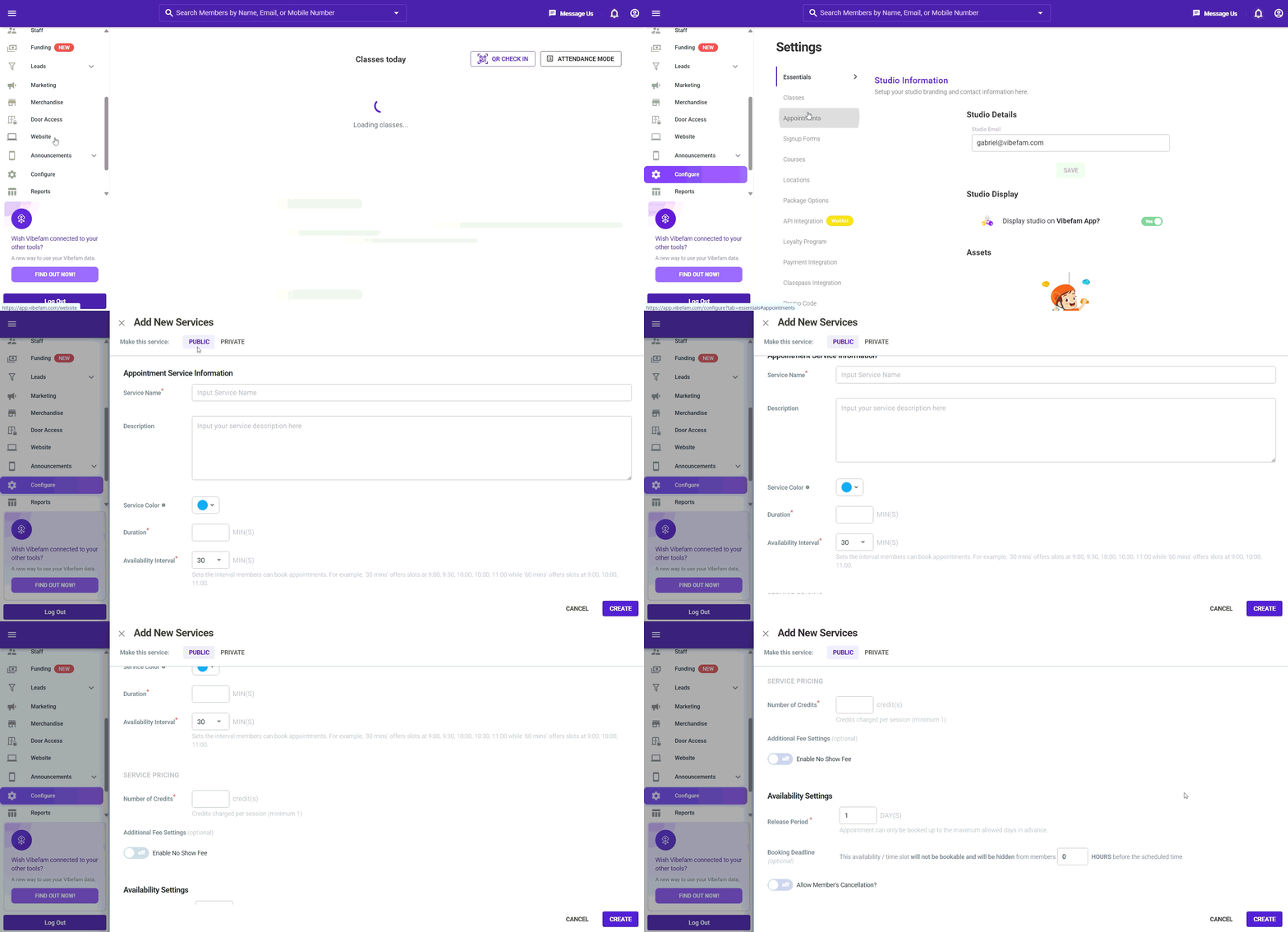
- Go to **Configure** and navigate to the **Services** (or **Appointments**) tab.
- Select **New Services** and complete the following fields:
- Service Name: Your appointment name
- Description: Short Description of your appointment type
- **Service Color:** Select a color for this appointment type to make it easy to distinguish at a glance.
- **Duration:** The length of each appointment session.
- Available Interval: Set the appointment interval timing between each appointments session. (For example, '30 mins' offers slots at 9:00, 9:30, 10:00, 10:30, 11:00 while '60 mins' offers slots at 9:00, 10:00, 11:00.)
- Number if Credits: Credit charge per appointment session
- No show fee (Optional): If you want to impose extra chargers for no show to the appointment.
- Release Period: How far ahead would youlike to release this appointment schedule.
- - Booking Deadline (Optional): To set a booking deadline for the appointment slots.
- Allow Member's cancellation toggle: Whether if you allow member to cancel the appointment slot or not.
- Courses are typically created for events, bootcamps, special class session, etc.
### **Courses** *\*This is available only on the professional plan*
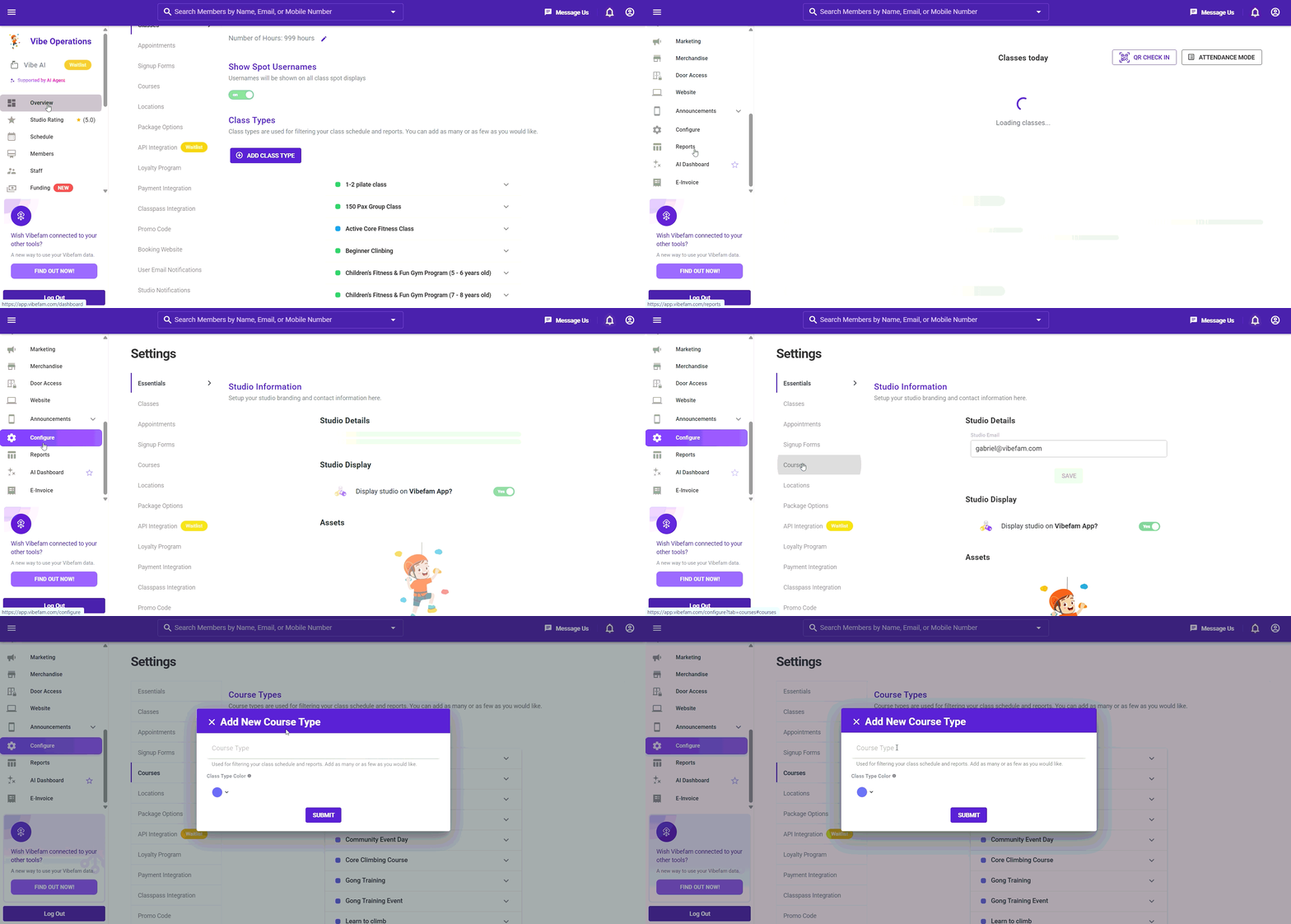
- Go to "**Configure**" -\> Navigate to **Courses** tab
- Select **Add Course Type** to define the types of courses offered at your studio. Course types are used to filter your courses and events — add as many types as your studio requires.
- Courses are typically created for events, bootcamps, special class session, etc.
- Note: Course Name **cannot** be empty
- [Getting started](https://support.vibefam.com/getting-started?hsLang=en)
- [Classes, Courses & Appointments](https://support.vibefam.com/classes-courses-appointments?hsLang=en)
- [Packages & Payments](https://support.vibefam.com/packages-payments?hsLang=en#main-content)
- [Packages](https://support.vibefam.com/packages-payments?hsLang=en#packages)
- [Payments](https://support.vibefam.com/packages-payments?hsLang=en#payments)
- [Booking & Scheduling](https://support.vibefam.com/booking-scheduling?hsLang=en)
- [Staff & Instructors](https://support.vibefam.com/staff-instructors?hsLang=en)
- [Members & Family Accounts](https://support.vibefam.com/members-family-accounts?hsLang=en)
- [Notifications & Marketing](https://support.vibefam.com/notifications-marketing?hsLang=en)
- [Integrations & Advanced Features](https://support.vibefam.com/integrations-advanced-features?hsLang=en)
- [Reports & Insights](https://support.vibefam.com/reports-insights?hsLang=en)
[](https://vibefam.com/)
Fitness management system for top fitness businesses
[mailto:help@vibefam.com](mailto:help@vibefam.com)
Copyright © 2026, Vibefam