
Pricing Groups let one package or membership carry a different price for each group of members. Give a Member Tag its own price, and members with that tag see and pay it when they log in. Everyone else pays your normal price.
For example, a 10-class package priced at $100 could cost $95 for Bronze members, $90 for Silver and $80 for Gold. New visitors to your booking website still check out at $100.
- Plans: Most Popular and Professional.
- Who can set group prices: owners and admins. Other roles need the Pricing Groups permission.
Before you start
Pricing Groups are built on Member Tags, so each group you price needs a tag first, such as Gold Member or Student. If you haven't used tags yet, see the Member Tags guide.
To let a staff role other than owner or admin set group prices, turn on the Pricing Groups permission for that role.
Step 1: Create the group's tag and tag members
- Go to Settings > Member Tags and click + Add tag.
- Name the tag after the group, such as Gold Member, Silver Member or Student, pick a colour, and click Add tag.
- Add the members who belong to that group, then click Done. You can also tag members later from their profile or the class list.
Repeat for each group you want to price. Members never see their tags, only the price.
Step 2: Add group prices to a package or membership
- Go to Settings > Package Option and open the package or membership you want to edit.
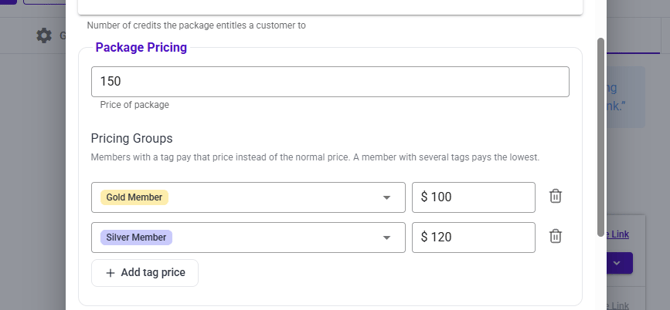
- Under Price of package, find the Pricing Groups section. Your normal price stays as it is.
- Click + Add tag price, choose a tag from the dropdown, and enter that group's price.
- Repeat for each group. To remove a group price, click the bin icon next to it.
- Save the package.
If a member has several tags with prices on the same package, they pay the lowest one.
What members see
Once logged in, a tagged member sees their group price automatically. There's no promo code to enter.
- Where: your booking website, website widgets, your branded app and the Vibefam app.
- What they don't see: their tag, or any other group's price.
- Logged out or untagged: they see and pay your normal price.
For example, a Gold member opening the $100 package sees $80 at checkout.
At the front desk
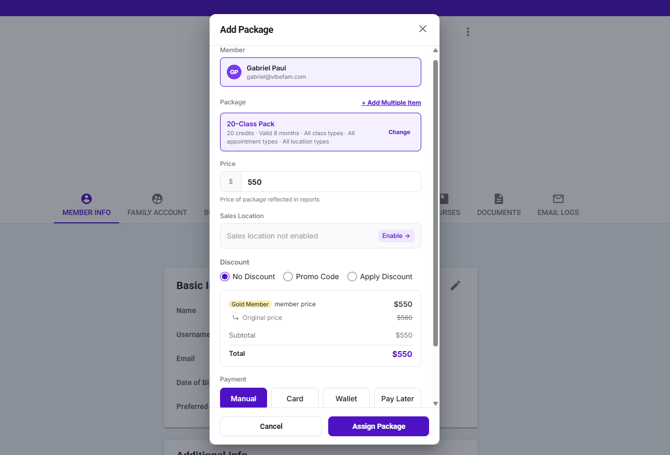
When you sell to a member through New Sale or Add Package, Vibefam fills in that member's group price and shows which group it came from. You don't need to look up their tier or apply a discount by hand.
In your reports
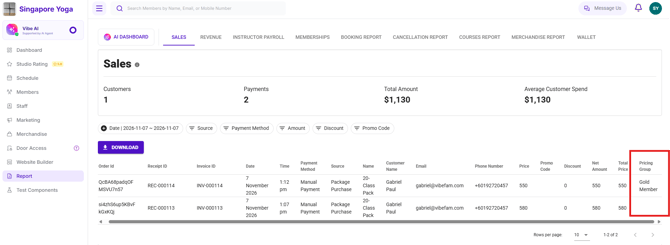
The Sales report shows which sales used a group price, so you can track how often each group price is used.
FAQ
What happens to memberships members have already bought? They keep renewing at the price they were bought at. A new group price applies to new purchases.
A member has two tags with prices. Which price do they pay? The lowest of their group prices for that package.
Can members see other groups' prices or their own tag? No. They only see the price that applies to them.
Do I still need promo codes for member tiers? No. Group prices apply automatically when the member is logged in, so there's no code to share or pass around.
Which plans include Pricing Groups? Most Popular and Professional.