---
title: Appointment System
description: The Appointment System lets you offer and manage 1-to-1 sessions alongside your group classes — personal training, physiotherapy, massage, consultations, beauty treatments, and anything else that's booked individually rather than as a group.
---
[Skip to content](https://support.vibefam.com/support-knowledge/appointment-system#main-content)
English
Show submenu for translations
[Request for Support](https://support.vibefam.com/support-knowledge/kb-tickets/new?hsLang=en)

- Topics
Show submenu for Topics
- [Getting started](https://support.vibefam.com/support-knowledge/getting-started)
- [Classes, Courses & Appointments](https://support.vibefam.com/support-knowledge/classes-courses-appointments)
- [Packages](https://support.vibefam.com/support-knowledge/packages-payments#packages)
- [Payments](https://support.vibefam.com/support-knowledge/packages-payments#payments)
- [Booking & Scheduling](https://support.vibefam.com/support-knowledge/booking-scheduling)
- [Staff & Instructors](https://support.vibefam.com/support-knowledge/staff-instructors)
- [Members & Family Accounts](https://support.vibefam.com/support-knowledge/members-family-accounts)
- [Notifications & Marketing](https://support.vibefam.com/support-knowledge/notifications-marketing)
- [Integrations & Advanced Features](https://support.vibefam.com/support-knowledge/integrations-advanced-features)
- [Reports & Insights](https://support.vibefam.com/support-knowledge/reports-insights)
- [Studio FAQs](https://support.vibefam.com/studio-owners-faq)
- [Instructor](https://support.vibefam.com/instructors-sign-up)
- [Members](https://support.vibefam.com/members-guide)
Open main navigation
Close main navigation
- Topics
Show submenu for Topics
- [Getting started](https://support.vibefam.com/support-knowledge/getting-started)
- [Classes, Courses & Appointments](https://support.vibefam.com/support-knowledge/classes-courses-appointments)
- [Packages](https://support.vibefam.com/support-knowledge/packages-payments#packages)
- [Payments](https://support.vibefam.com/support-knowledge/packages-payments#payments)
- [Booking & Scheduling](https://support.vibefam.com/support-knowledge/booking-scheduling)
- [Staff & Instructors](https://support.vibefam.com/support-knowledge/staff-instructors)
- [Members & Family Accounts](https://support.vibefam.com/support-knowledge/members-family-accounts)
- [Notifications & Marketing](https://support.vibefam.com/support-knowledge/notifications-marketing)
- [Integrations & Advanced Features](https://support.vibefam.com/support-knowledge/integrations-advanced-features)
- [Reports & Insights](https://support.vibefam.com/support-knowledge/reports-insights)
- [Studio FAQs](https://support.vibefam.com/studio-owners-faq)
- [Instructor](https://support.vibefam.com/instructors-sign-up)
- [Members](https://support.vibefam.com/members-guide)
- English
Show submenu for translations
- [Request for Support](https://support.vibefam.com/support-knowledge/kb-tickets/new)
How can we help you?
- There are no suggestions because the search field is empty.
1. [Support Knowledge Centre](https://support.vibefam.com/support-knowledge?hsLang=en)
2. [Classes, Courses & Appointments](https://support.vibefam.com/support-knowledge/classes-courses-appointments?hsLang=en)
# Appointment System
## Appointment System lets you offer and manage 1-to-1 sessions
The Appointment System lets you offer and manage **1-to-1 sessions** alongside your group classes — personal training, physiotherapy, massage, consultations, beauty treatments, and anything else that's booked individually rather than as a group.
Members book appointments based on your real-time availability, so there's no manual back-and-forth to coordinate times.
- [What is the Appointment System?](https://support.vibefam.com/support-knowledge/appointment-system#what_is_appointment_system)
- [How It Works — User Booking Flow](https://support.vibefam.com/support-knowledge/appointment-system#user_booking_flow)
- [How to Set It Up](https://support.vibefam.com/support-knowledge/appointment-system#how_to_set_it_up)
- [Step 1: Create a service](https://support.vibefam.com/support-knowledge/appointment-system#Step_1_Create_a_service)
- [Step 2: Make packages eligible](https://support.vibefam.com/support-knowledge/appointment-system#Step_2_make_package_eligible)
- [Step 3: Add appointments to the schedule](https://support.vibefam.com/support-knowledge/appointment-system#Step_3_Add_appointments_to_schedule)
- [Viewing appointment availability](https://support.vibefam.com/support-knowledge/appointment-system#view_appointment_availability)
- [Showing appointments on your booking site](https://support.vibefam.com/support-knowledge/appointment-system#showing_appointments_on_booking_site)
- [Which studios is this for?](https://support.vibefam.com/support-knowledge/appointment-system#which_studio_is_this_for)
- [Before you go live](https://support.vibefam.com/support-knowledge/appointment-system#before_you_go_live)
**Where appointments appear:** the appointment booking tab is available on your **booking website and branded app** only.
---
### ** 💡What is the Appointment System? **
Not all services thrive on group sessions — some shine through **personalized, one-on-one attention**.
Think **personal training**, **physiotherapy**, **massage therapy**, or **consultations**.
With Appointment Booking, your studio can now:
- **Open new revenue streams** by offering private 1:1 sessions alongside group classes.
- **Fill your trainers’ schedules smarter** — members book based on real-time availability, no more manual coordination.
- **Deliver a premium client experience** with dedicated, personal sessions that keep members coming back.
---
### ** 🗓️ How It Works — User Booking Flow **
Your members can now book 1:1 sessions through a **new Appointment Tab** on your booking website. (ℹ️*Note: This is only available on the booking website & branded app)*
#### **Step 1: Enter the booking website/branded app**
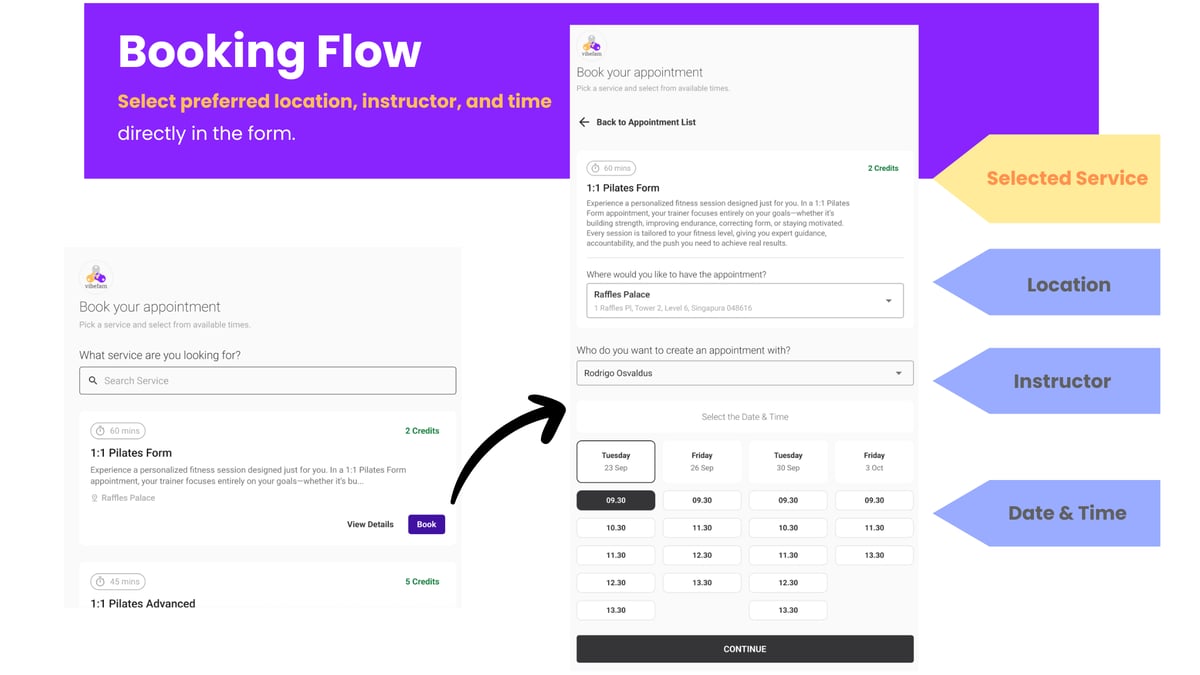
#### ** 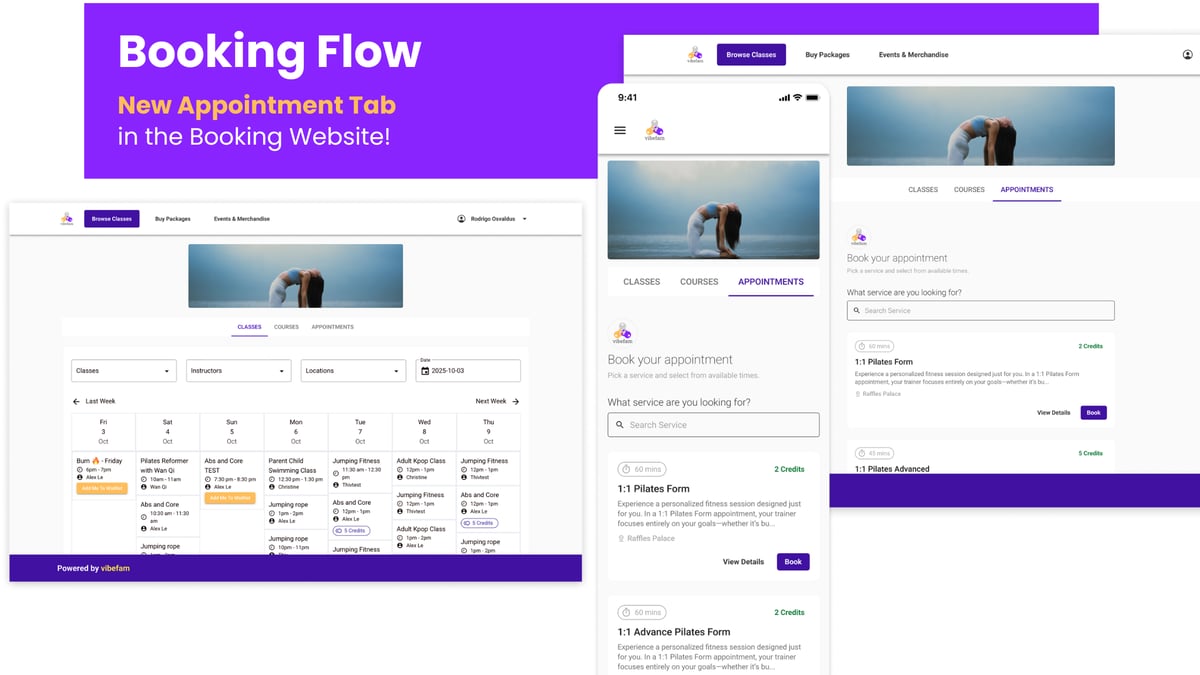 Step 2: Users can select the service or appointments.**
- Select their preferred service
- Choose a location, instructor, date, and time
- 
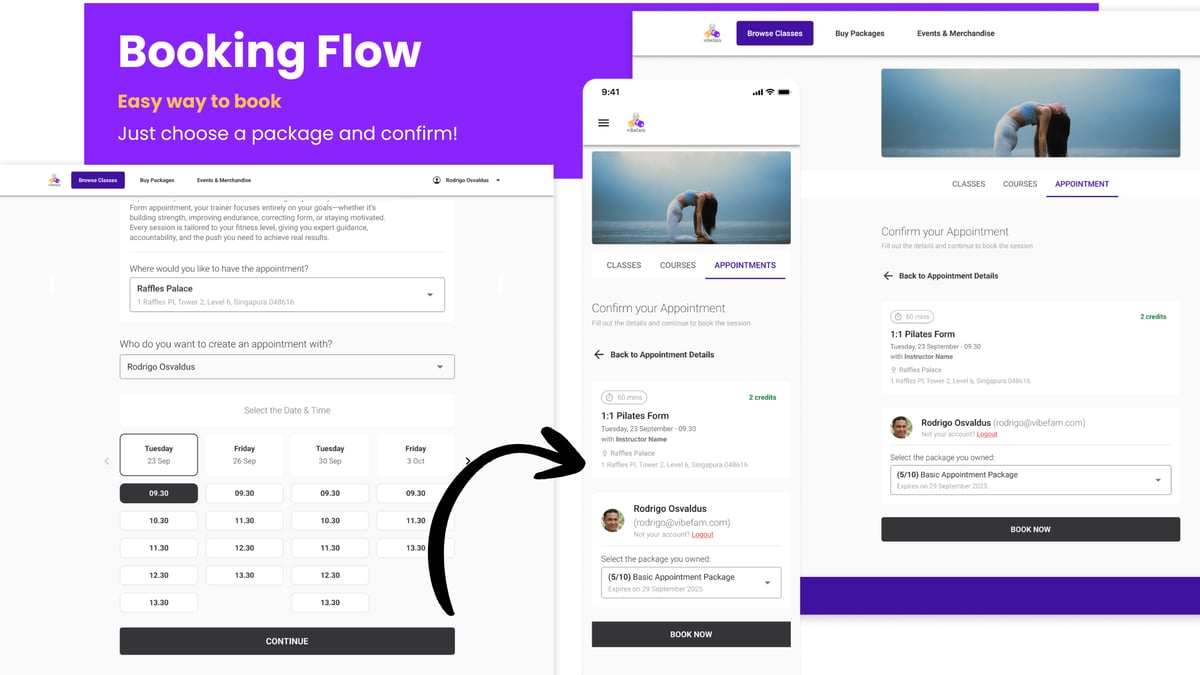
#### **Step 3: Book and confirm using a package — all in just a few taps!**
**  **
#### ** Step 4: Confirmed Appointment Bookings**
* 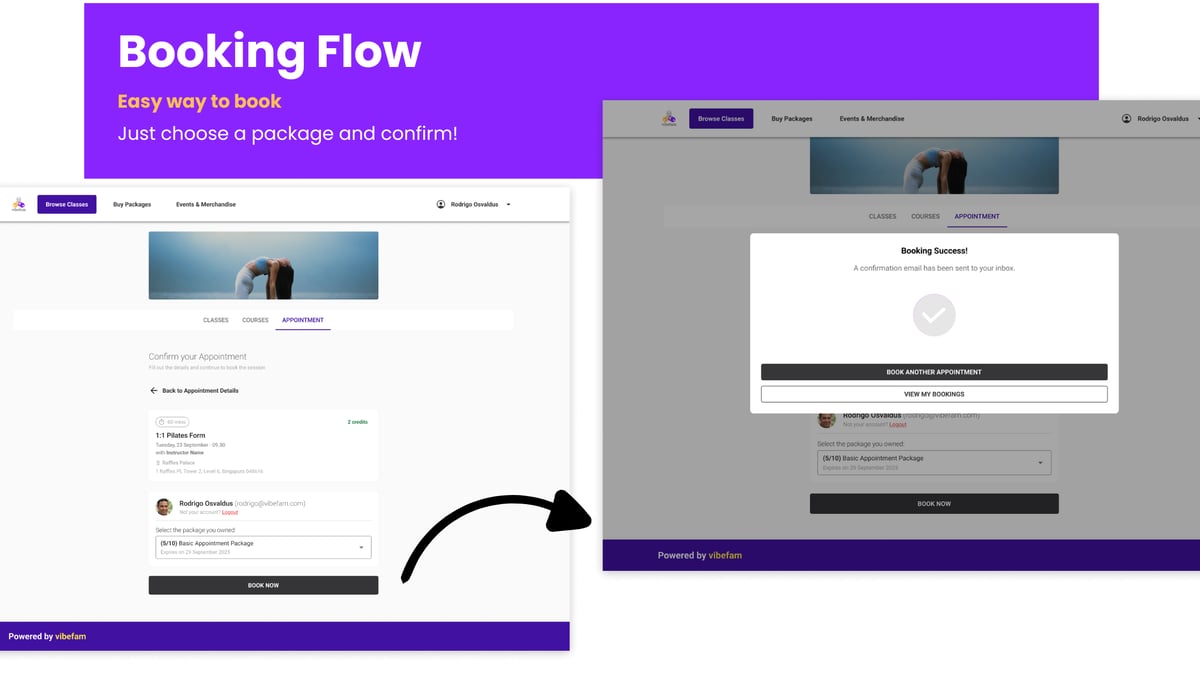 No hassle, no back-and-forth — just smooth, direct booking. *
---
### ** ⚙️ How to Set It Up **
Setup has three parts: create the service, make sure a package can pay for it, and add availability to your schedule.
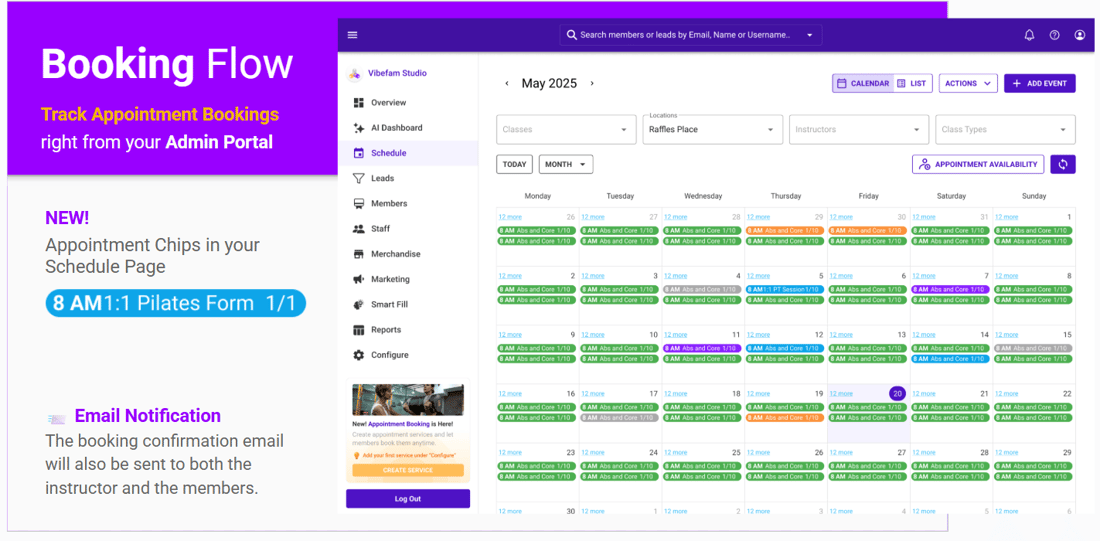
- Track all upcoming **appointment bookings** directly in your **Admin Portal**.
- View appointments easily on your **schedule**
- Receive **automated email notifications** for every new booking — sent to both the **instructor and the member** for confirmation.
#### **Step 1: Create a service**
** 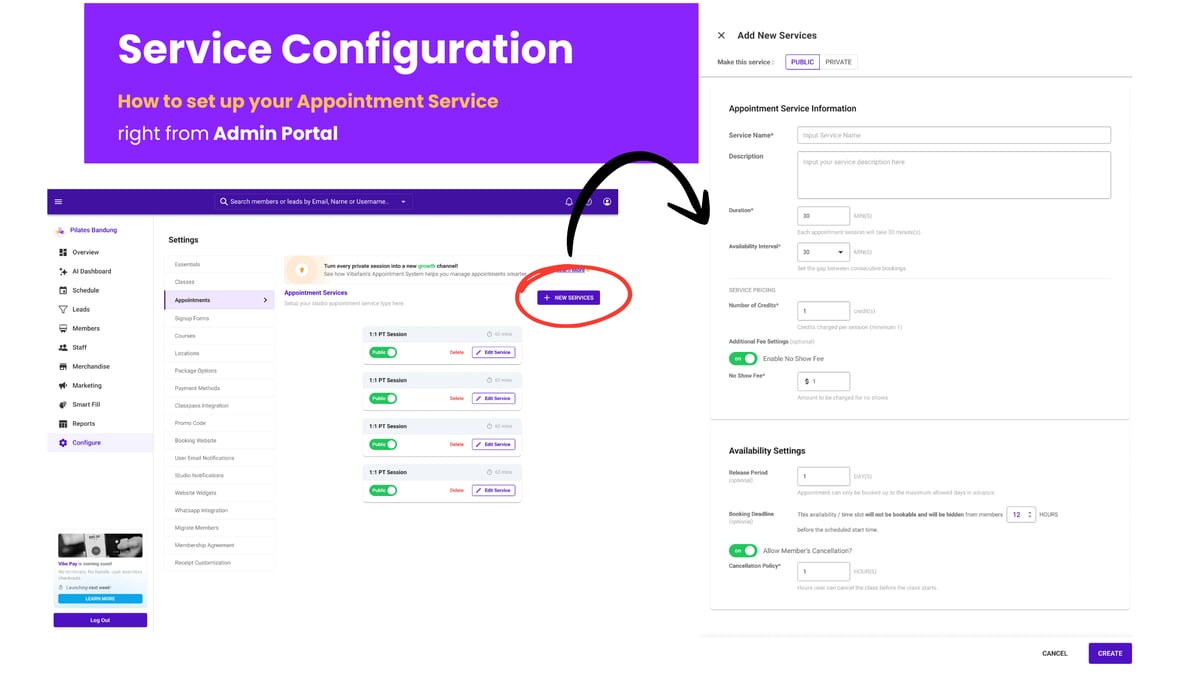** Go to **Configure → Appointments → + New Services**.
**Visibility**
** 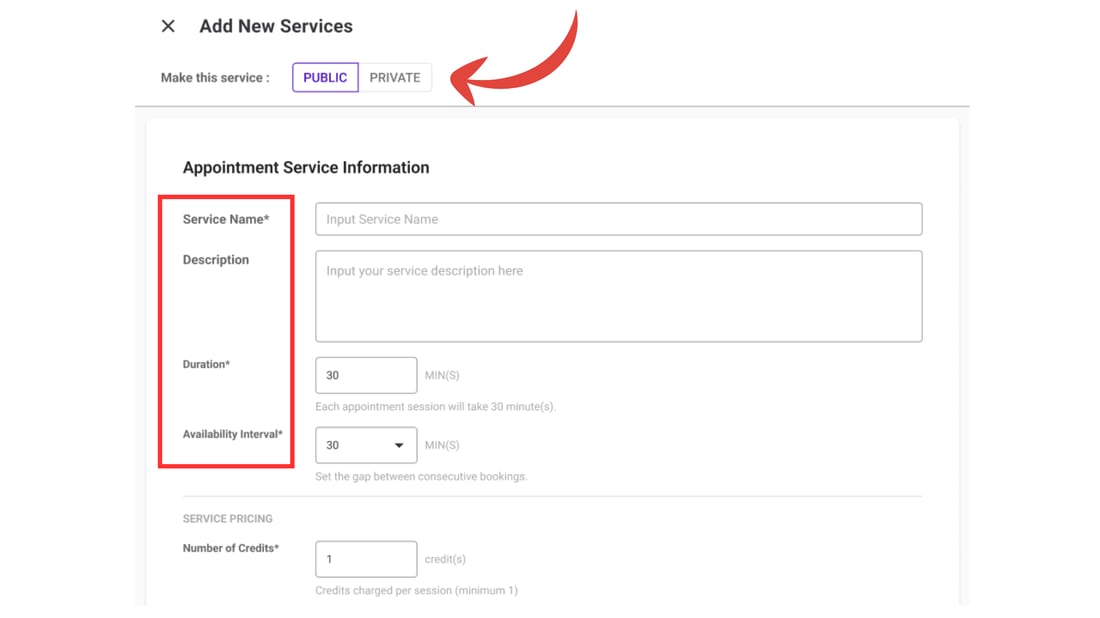**
- **Public** — visible on your booking website and app
- **Private** — hidden from the front end (useful for services you only book manually, or offer to select members)
**Service details**
- **Service Name** — what members see (e.g. *60-min Personal Training*)
- **Description** — a short explanation of the service
- **Duration** — how long each session lasts
- **Availability Interval** — the gap between bookable start times. This controls how tightly sessions can be packed:
- *With a 30-min duration and a 15-min interval, members can start at 12:00, 12:15, 12:30, 12:45…*
- *With a 30-min interval, they can only start at 12:00, 12:30, 13:00…*
- A shorter interval fills your schedule more densely; a longer one builds in breathing room between sessions.
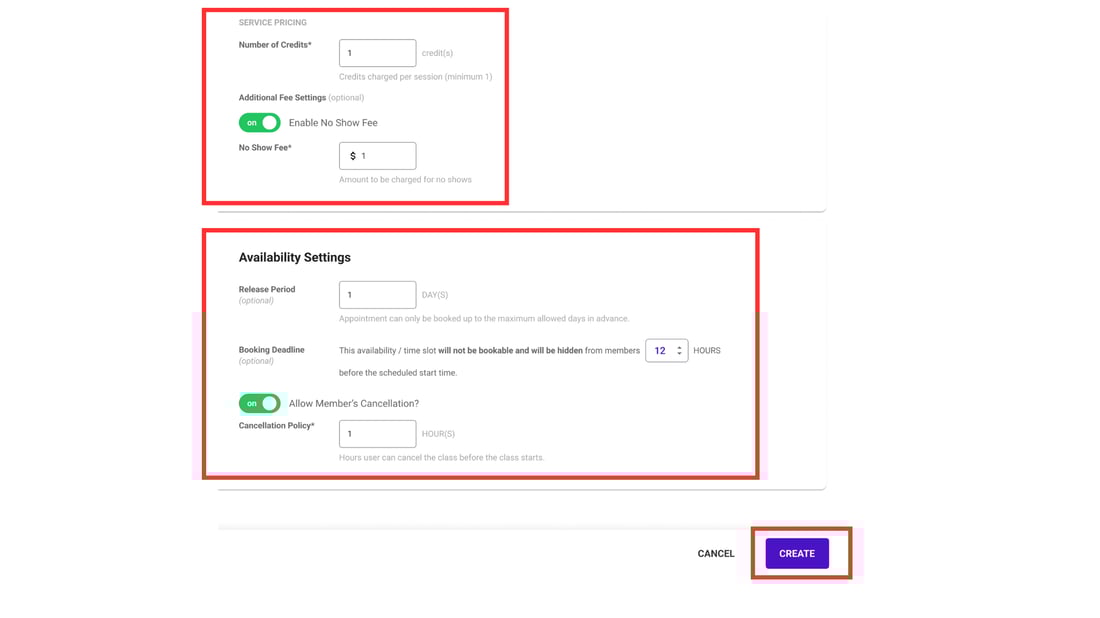 **Credits and optional rules**
- **Number of Credits** — how many credits each appointment costs from a member's package.
- **Additional Fee (optional)** — a no-show fee. If attendance isn't marked, the system flags it the next day and warns that a no-show fee applies. If it isn't rectified (or the member forgiven) by day's end, their saved card is charged this amount automatically.
- **Release Period (optional)** — members can only book up to X days ahead. Useful for keeping bookings within a window you can actually commit to.
- **Booking Deadline (optional)** — the latest a member can book before the session, so instructors don't get last-minute bookings.
- **Allow Member's Cancellation?** — sets how long before the session a member is allowed to cancel.
Click **Create** when done.
#### **Step 2: Make packages eligible**
** 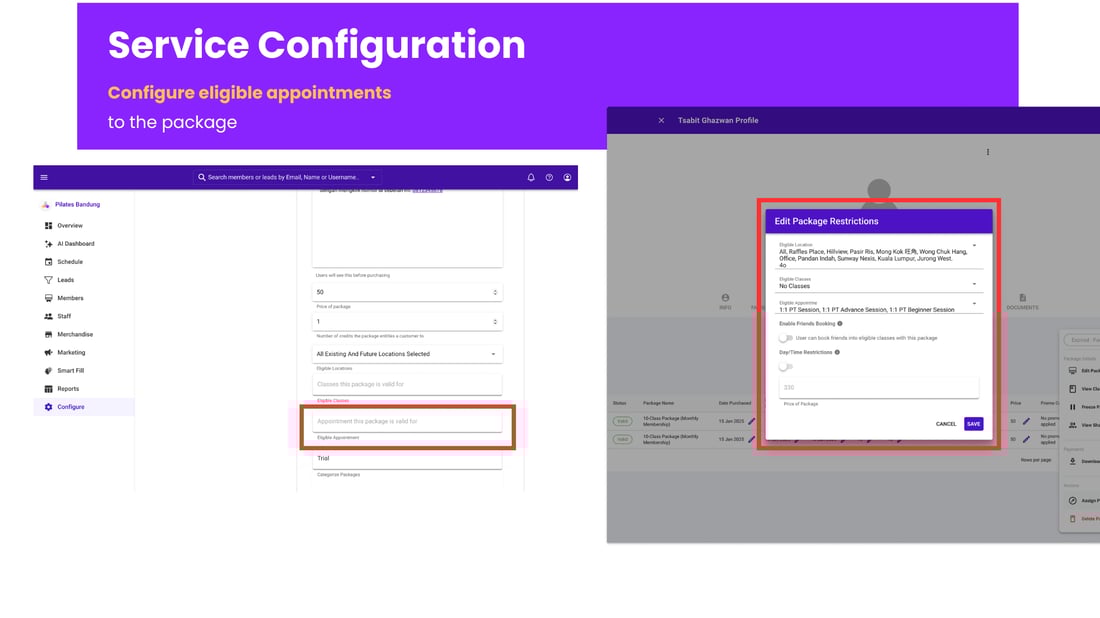** An appointment can only be booked with a package that's allowed to pay for it. Go to **Configure → Package Options** and select the package that should cover this appointment.
You can do this in two ways:
- **On the package** — add the appointment to the package's eligibility, so everyone with that package can book it, or
- **On an individual member** — add it to a specific member's existing package.
#### **Step 3: Add appointments to the schedule**
** 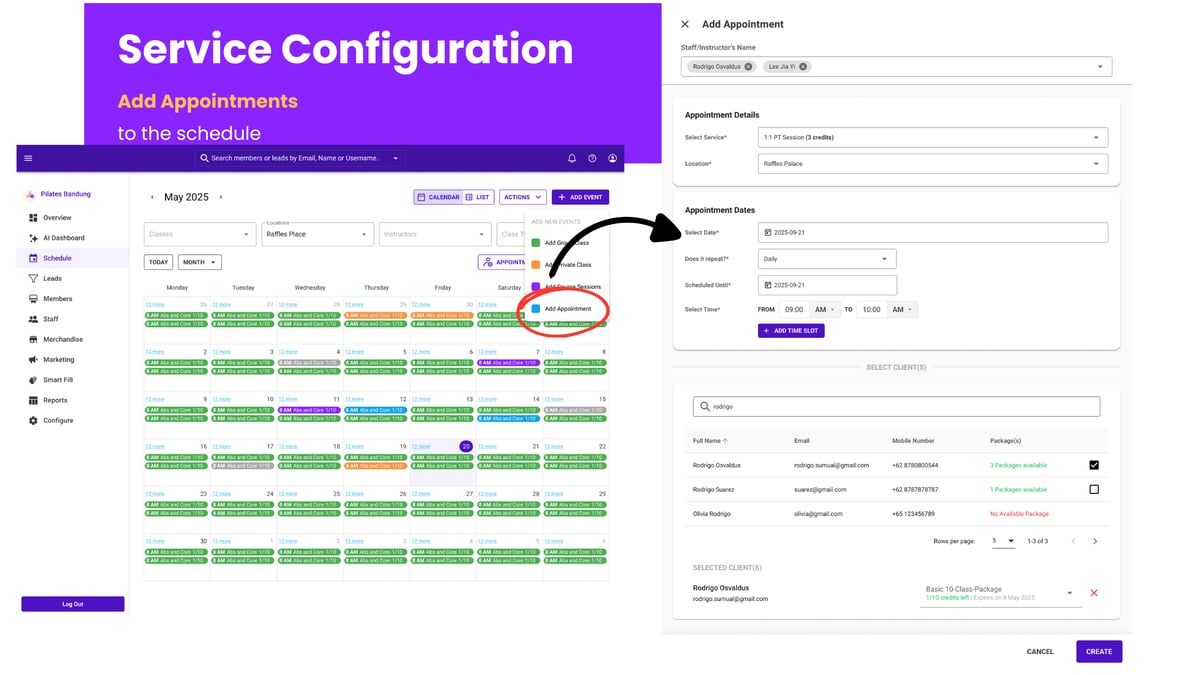** Creating the service defines *what* the appointment is; adding it to the schedule defines *when* it's available and *who* runs it.
1. Go to **Schedule → Add Events → Add Appointment**.
2. Set the details:
- **Staff / Instructor** — who runs this appointment slot
- **Select Service** — the service you created in Step 1
- **Location** — where it's held
3. Set the dates:
- **Select Date** — the appointment date
- **Does it Repeat?** — for recurring availability, set the pattern
- **Schedule Until** — the end date for a repeating appointment (same as classes and courses)
- **Select Time** — the session time
4. Optionally, **add the member** and their eligible package directly.
5. Click **Create**.
Your appointment is now live and bookable.
---
### **Viewing appointment availability**
** 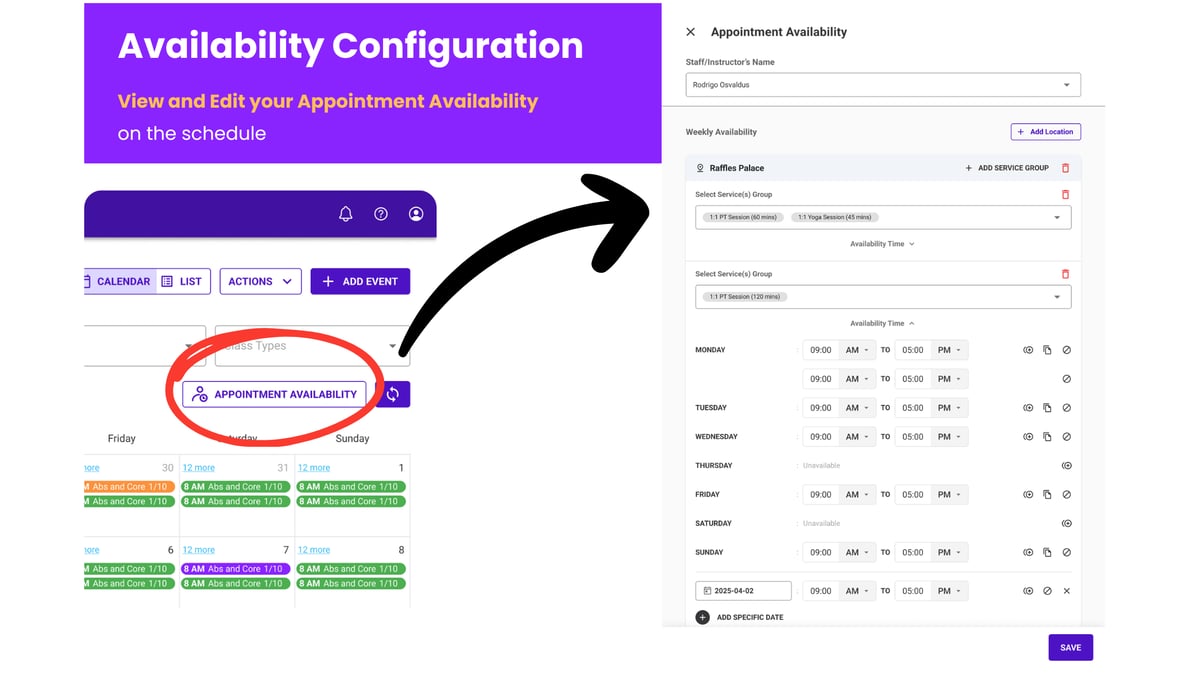** Go to **Schedule → Appointment Availability**.
Here you can see each instructor's schedule and open availability, and add or remove appointment slots by location. It's the quickest way to see where you have capacity and where a trainer is fully booked.
---
### **Showing appointments on your booking site**
** 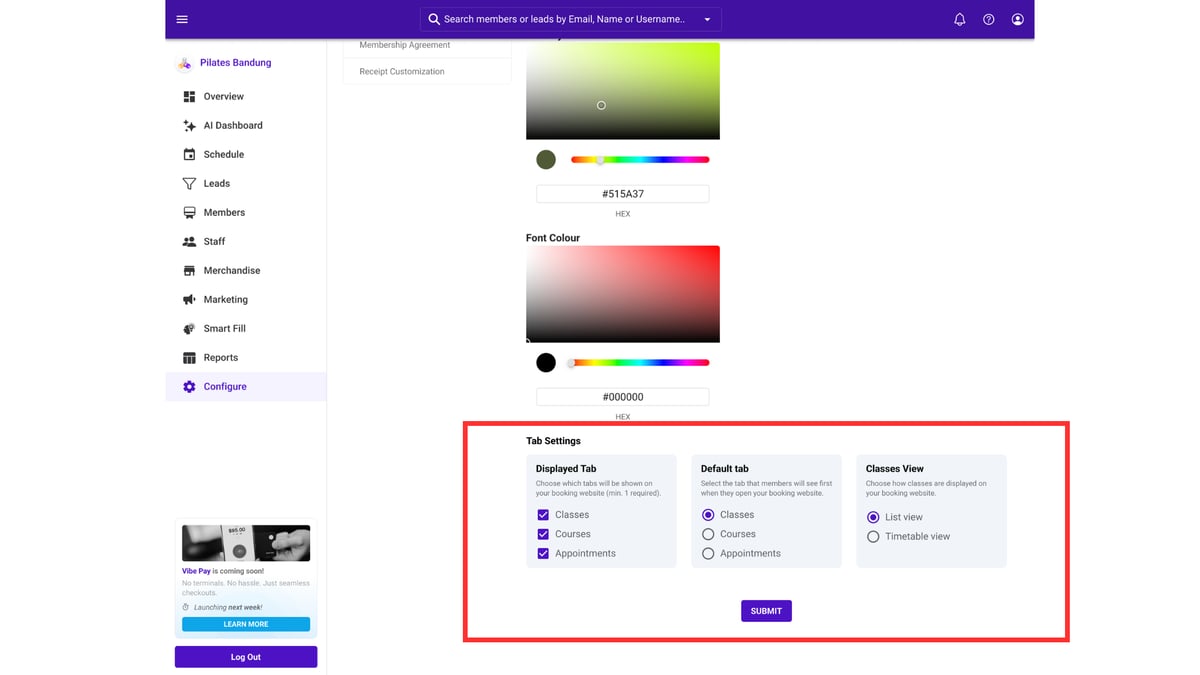** Control how appointments appear to members under **Configure → Booking Website**:
- **Display tab** — choose whether Classes, Courses, and Appointments each appear
- **Default tab** — set which one members land on first
- **View** — show your schedule as a **List** or **Timetable**
See [Setting up your booking website](https://support.vibefam.com/studio-owners-configure-essentials?hsLang=en#Setup-Booking-Website) for the full walkthrough.
---
### **Which studios is this for?**
Appointments suit any studio offering individual sessions alongside — or instead of — group classes:
- Personal training and private coaching
- Massage and wellness
- Chiropractic and physiotherapy
- Beauty and aesthetics
- Consultations of any kind
---
### **Before you go live**
- Book a test appointment yourself, end to end, on your booking website
- Confirm the confirmation emails reach both instructor and member
- Check your package is eligible, or members won't be able to pay with it
- Make sure your **payment integration** is set up if you're charging no-show fees
- [Getting started](https://support.vibefam.com/support-knowledge/getting-started?hsLang=en)
- [Classes, Courses & Appointments](https://support.vibefam.com/support-knowledge/classes-courses-appointments?hsLang=en)
- [Packages & Payments](https://support.vibefam.com/support-knowledge/packages-payments?hsLang=en#main-content)
- [Packages](https://support.vibefam.com/support-knowledge/packages-payments?hsLang=en#packages)
- [Payments](https://support.vibefam.com/support-knowledge/packages-payments?hsLang=en#payments)
- [Booking & Scheduling](https://support.vibefam.com/support-knowledge/booking-scheduling?hsLang=en)
- [Staff & Instructors](https://support.vibefam.com/support-knowledge/staff-instructors?hsLang=en)
- [Members & Family Accounts](https://support.vibefam.com/support-knowledge/members-family-accounts?hsLang=en)
- [Notifications & Marketing](https://support.vibefam.com/support-knowledge/notifications-marketing?hsLang=en)
- [Integrations & Advanced Features](https://support.vibefam.com/support-knowledge/integrations-advanced-features?hsLang=en)
- [Reports & Insights](https://support.vibefam.com/support-knowledge/reports-insights?hsLang=en)
[](https://vibefam.com/)
Fitness management system for top fitness businesses
[mailto:help@vibefam.com](mailto:help@vibefam.com)
Copyright © 2026, Vibefam