---
title: User Email Notifications
description: This article covers turning them on, customising the design, and switching between your own template and Vibefam's default.
---
[Skip to content](https://support.vibefam.com/user-email-notifications#main-content)
English
Show submenu for translations
[Request for Support](https://support.vibefam.com/kb-tickets/new?hsLang=en)
[](https://support.vibefam.com/?hsLang=en)
- Topics
Show submenu for Topics
- [Getting started](https://support.vibefam.com/support-knowledge/getting-started)
- [Classes, Courses & Appointments](https://support.vibefam.com/support-knowledge/classes-courses-appointments)
- [Packages](https://support.vibefam.com/support-knowledge/packages-payments#packages)
- [Payments](https://support.vibefam.com/support-knowledge/packages-payments#payments)
- [Booking & Scheduling](https://support.vibefam.com/support-knowledge/booking-scheduling)
- [Staff & Instructors](https://support.vibefam.com/support-knowledge/staff-instructors)
- [Members & Family Accounts](https://support.vibefam.com/support-knowledge/members-family-accounts)
- [Notifications & Marketing](https://support.vibefam.com/support-knowledge/notifications-marketing)
- [Integrations & Advanced Features](https://support.vibefam.com/support-knowledge/integrations-advanced-features)
- [Reports & Insights](https://support.vibefam.com/support-knowledge/reports-insights)
- [Studio FAQs](https://support.vibefam.com/studio-owners-faq)
- [Schedule a call with us](https://meetings-na2.hubspot.com/vibefam-support/customer-success-meeting-scheduler)
Open main navigation
Close main navigation
- Topics
Show submenu for Topics
- [Getting started](https://support.vibefam.com/support-knowledge/getting-started)
- [Classes, Courses & Appointments](https://support.vibefam.com/support-knowledge/classes-courses-appointments)
- [Packages](https://support.vibefam.com/support-knowledge/packages-payments#packages)
- [Payments](https://support.vibefam.com/support-knowledge/packages-payments#payments)
- [Booking & Scheduling](https://support.vibefam.com/support-knowledge/booking-scheduling)
- [Staff & Instructors](https://support.vibefam.com/support-knowledge/staff-instructors)
- [Members & Family Accounts](https://support.vibefam.com/support-knowledge/members-family-accounts)
- [Notifications & Marketing](https://support.vibefam.com/support-knowledge/notifications-marketing)
- [Integrations & Advanced Features](https://support.vibefam.com/support-knowledge/integrations-advanced-features)
- [Reports & Insights](https://support.vibefam.com/support-knowledge/reports-insights)
- [Studio FAQs](https://support.vibefam.com/studio-owners-faq)
- [Schedule a call with us](https://meetings-na2.hubspot.com/vibefam-support/customer-success-meeting-scheduler)
- English
Show submenu for translations
- [Request for Support](https://support.vibefam.com/kb-tickets/new)
How can we help you?
- There are no suggestions because the search field is empty.
1. [Support Knowledge Centre](https://support.vibefam.com/?hsLang=en)
2. [Notifications & Marketing](https://support.vibefam.com/notifications-marketing?hsLang=en)
# User Email Notifications
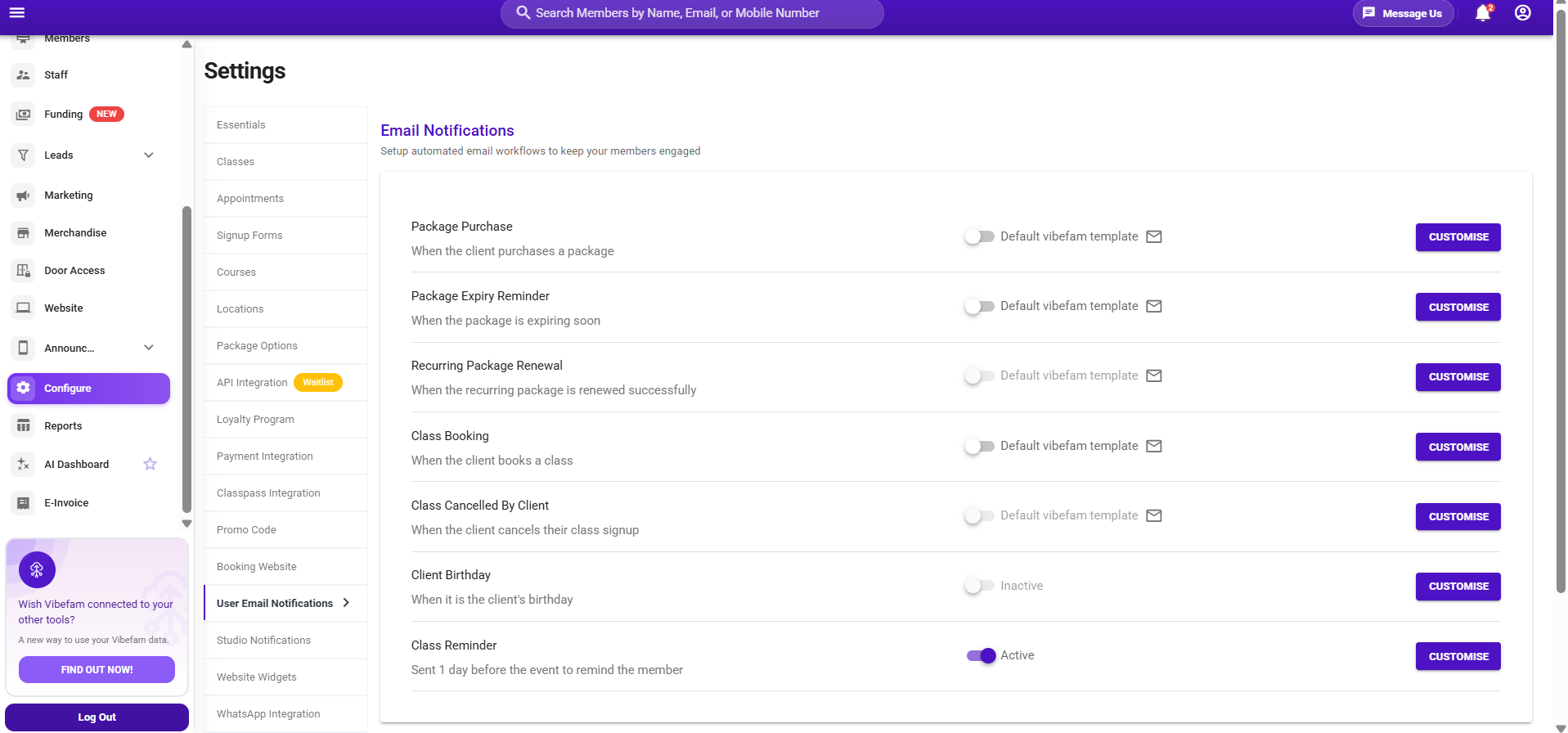
User email notifications are the automated messages your members receive when something happens on their account — a package purchase confirmation, a package expiry reminder, and similar. These appear both in the Vibefam app and by email.
This article covers turning them on, customising the design, and switching between your own template and Vibefam's default.
Navigate to **Configure → User Email Notifications**.
---
### ** The notifications you can send**
Each notification is triggered automatically by a specific member action:
| Notification | Sent when |
| --- | --- |
| **Package Purchase** | A client purchases a package |
| **Package Expiry Reminder** | A package is expiring soon |
| **Recurring Package Renewal** | A recurring package renews successfully |
| **Class Booking** | A client books a class |
| **Class Cancelled By Client** | A client cancels their class signup |
| **Client Birthday** | It's the client's birthday |
| **Class Reminder** | Sent 1 day before the event to remind the member |
---
### **Turning notifications on**
1. Go to **Configure → User Email Notifications**.
2. You'll see the available automated messages — for example **Package purchase confirmation** and **Package expiry reminder**.
3. Enable the notifications you want members to receive.
These are the transactional emails that keep members informed, so most studios leave the key ones (like purchase confirmations) switched on.
---
### **Customising an email template**
You can send Vibefam's default design, or customise your own to match your studio's branding.
1. Next to a notification, click **Customize**.
2. Edit the content and design in the editor.
3. Click **Save Design**.
Your customised version is now saved against that notification — but it isn't applied until you switch to it (below).
---
### **Switching between your template and the default**
Each notification has a toggle that decides which design actually goes out:
- **"Default Vibefam Template" toggled on** — members receive Vibefam's standard design.
- **Toggle it off** — it switches to **"Use current template,"** and members receive the custom design you saved.
So the flow is: customise and save your design first, then toggle off the default template to put your version live. To go back to Vibefam's design at any time, toggle it back on.
Saving a custom design doesn't switch it on by itself. If your branded email isn't going out, check that the default-template toggle is **off** for that notification.
---
### **Previewing the default template**
To see what Vibefam's standard design looks like before deciding, click **Default Template** to preview it.
- [Getting started](https://support.vibefam.com/getting-started?hsLang=en)
- [Classes, Courses & Appointments](https://support.vibefam.com/classes-courses-appointments?hsLang=en)
- [Packages & Payments](https://support.vibefam.com/packages-payments?hsLang=en#main-content)
- [Packages](https://support.vibefam.com/packages-payments?hsLang=en#packages)
- [Payments](https://support.vibefam.com/packages-payments?hsLang=en#payments)
- [Booking & Scheduling](https://support.vibefam.com/booking-scheduling?hsLang=en)
- [Staff & Instructors](https://support.vibefam.com/staff-instructors?hsLang=en)
- [Members & Family Accounts](https://support.vibefam.com/members-family-accounts?hsLang=en)
- [Notifications & Marketing](https://support.vibefam.com/notifications-marketing?hsLang=en)
- [Integrations & Advanced Features](https://support.vibefam.com/integrations-advanced-features?hsLang=en)
- [Reports & Insights](https://support.vibefam.com/reports-insights?hsLang=en)
[](https://vibefam.com/)
Fitness management system for top fitness businesses
[mailto:help@vibefam.com](mailto:help@vibefam.com)
Copyright © 2026, Vibefam