Vibe AI: Support Guide & FAQs
A reference guide for studios on how Vibe AI automates class bookings, cancellations and rebooking over WhatsApp. Answers to the most common questions.
1. What Is Vibe AI?
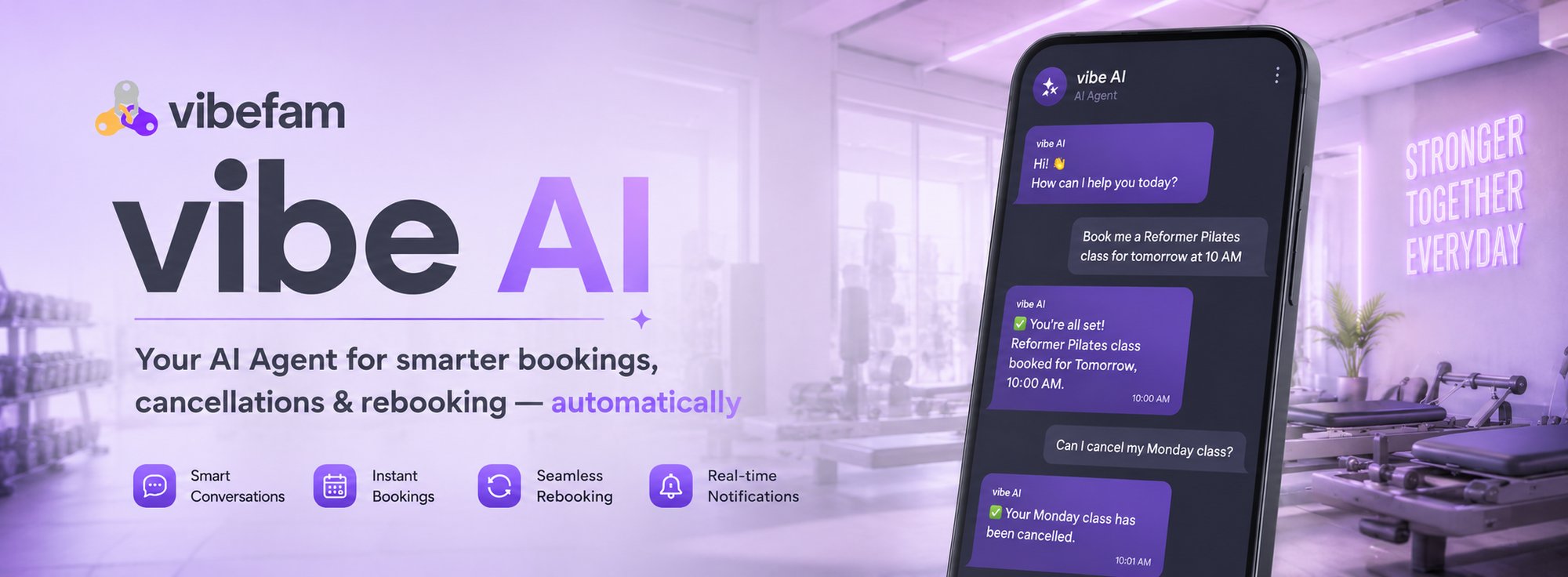
Vibe AI is your studio's automated booking assistant on WhatsApp. It notifies members about class changes, answers booking questions, and lets members book, cancel, and rebook classes by simply replying to a WhatsApp message. All without any staff involvement.
When a class gets cancelled or a member wants to book, the AI Agent manages the entire conversation on WhatsApp, from the first notification through to a confirmed booking.
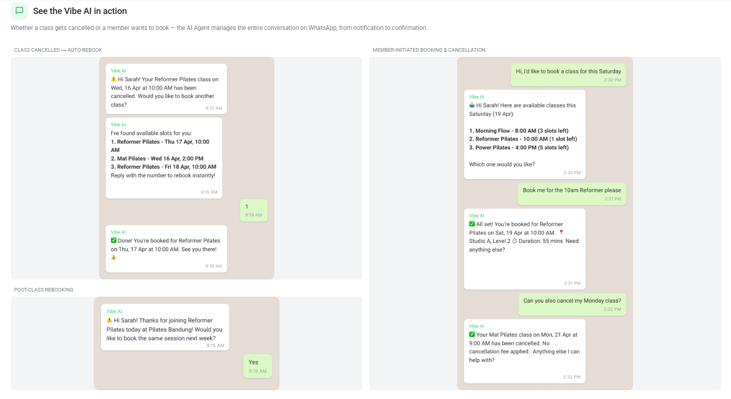
Vibe AI handling a cancelled class, a member-initiated booking, and a post-class rebooking prompt — all automatically.
Why studios use it
|
Benefit |
What it means |
|---|---|
|
Save staff hours |
No more manual calls or messages to rebook members. The AI handles hundreds of conversations simultaneously. |
|
Instant notifications |
Members are notified within seconds of a cancellation, reducing frustration. |
|
Policy compliance |
Cancellation fees, booking limits, and package rules are automatically enforced — no human errors. |
|
24/7 availability |
Members can book or cancel anytime, even at midnight. The AI Agent never sleeps. |
2. How Vibe AI Talks to Your Members
Vibe AI sends three types of automated WhatsApp messages on your studio's behalf. Each message invites the member to reply directly to take action, and no app download or login is required.
|
Message type |
Example message |
|---|---|
|
Booking reminder |
“Hi , just a reminder you're booked in for tomorrow at at ! If you'd like to book another class or cancel this one, just reply to this message.” |
|
Post-class rebooking |
“Hi , thanks for joining today at ! Would you like to book the same session next week?” |
|
Class cancellation |
“Hi , your on at at has been cancelled. Would you like to book another class?” |
3. What Members Can Do Through the AI Agent
Beyond automated notifications, members can talk to the AI Agent directly — browsing the schedule, booking, cancelling, and checking their own account, all inside the same WhatsApp thread.
|
# |
Action |
|---|---|
|
1 |
Browse group classes |
|
2 |
Book a group class |
|
3 |
Cancel a group class booking |
|
4 |
Get upcoming group classes |
|
5 |
Check package details |
Current scope: Vibe AI currently supports Group Classes only. Appointments and Courses are not yet supported in this release
4. Accessing and Managing Conversations in Your Vibe AI Inbox
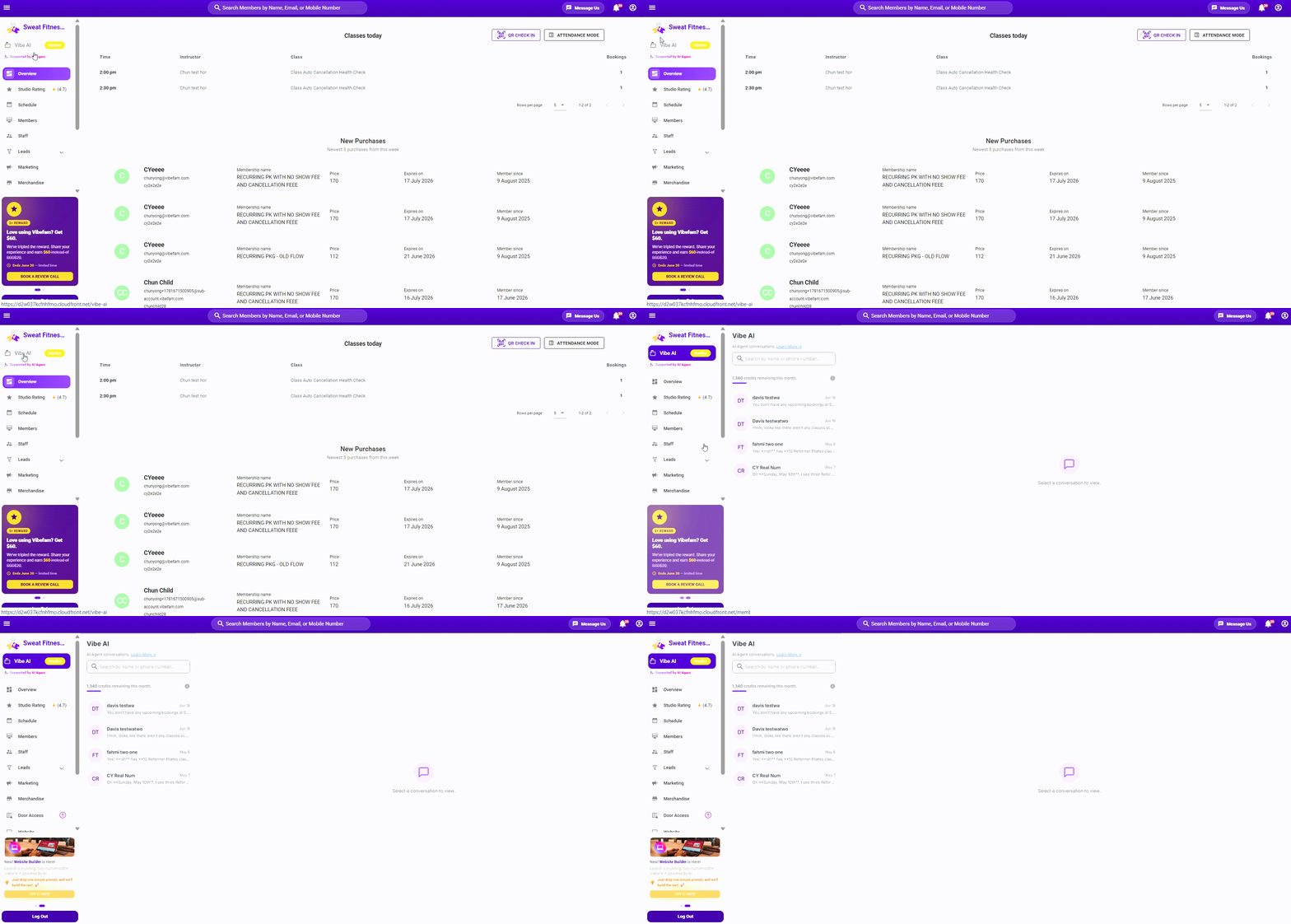
Logging in to your vibefam admin portal. Then click on "VibeAI" on the left tab: 
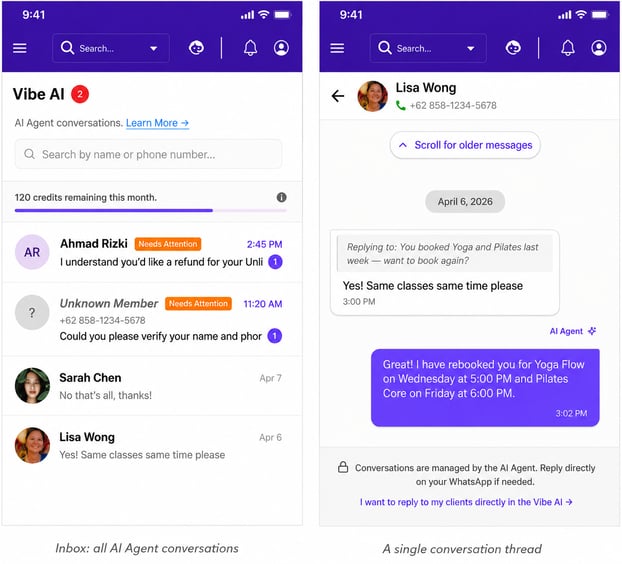
Every AI Agent conversation is logged in your Vibe AI inbox, inside your studio dashboard. You can review any conversation at any time, even though replies are handled by the AI.
- View Conversation History — see the full back-and-forth between the AI Agent and any member.
- Escalation Alerts — conversations the AI Agent flags as “Needs Attention” (for example, a refund request) are highlighted so your team can step in.
- Reply Restriction (for now) — staff can view conversations but can't yet reply directly from the inbox; members are told to message the studio separately if they need a human.
5. Credits & Billing
Vibe AI runs on a credit system. Every automated message and every action the AI Agent performs on a member's behalf uses credits from your studio's balance.
|
Item |
Cost |
Approx. value |
|---|---|---|
|
Automated message (reminder, rebooking, cancellation notice) |
10 credits |
~US$0.10 |
|
AI Agent action (e.g. booking, cancelling, checking a package) |
30 credits |
~US$0.30 |
|
1 credit |
— |
~US$0.01 |
Free monthly credits
Every studio receives free credits each month so Vibe AI can run at no cost. The amount is sized to your studio so that everyone gets a comparable amount of value — a flat number for every studio would leave small studios running out on day one, while larger studios would barely use theirs.
Your dashboard shows your current balance and renewal date — for example, a studio on a 2,500 credit/month plan (worth about US$25) sees its balance reset on the 1st of every month. New studios start on a flat introductory amount.
Manual top-up
If you run low on credits, you can top up manually at any time from Vibe AI → Top Up Credits. Enter the number of credits you'd like to add, confirm the amount, and it's charged to the card on file for your subscription.
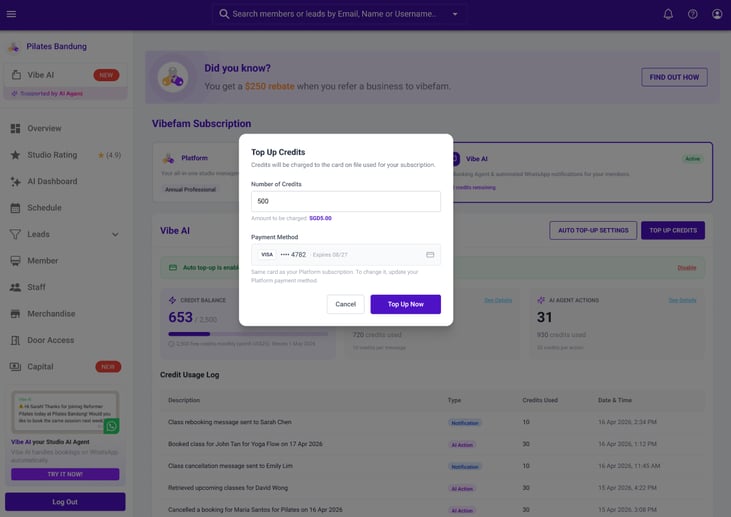
Manual top-up: choose a credit amount and confirm the charge.
Auto top-up
To avoid ever running out, enable Auto Top-Up from Vibe AI → Auto Top-Up Settings. Set a credit amount to add and a balance threshold — once your balance falls below that threshold, the same amount is automatically charged to your card on file.
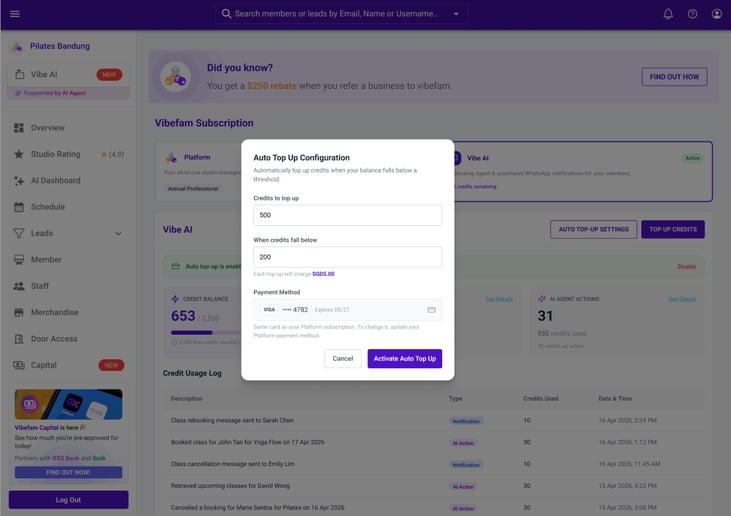
Auto top-up configuration: set the top-up amount and the balance threshold that triggers it.
Once enabled, your dashboard confirms the active rule and your current balance:
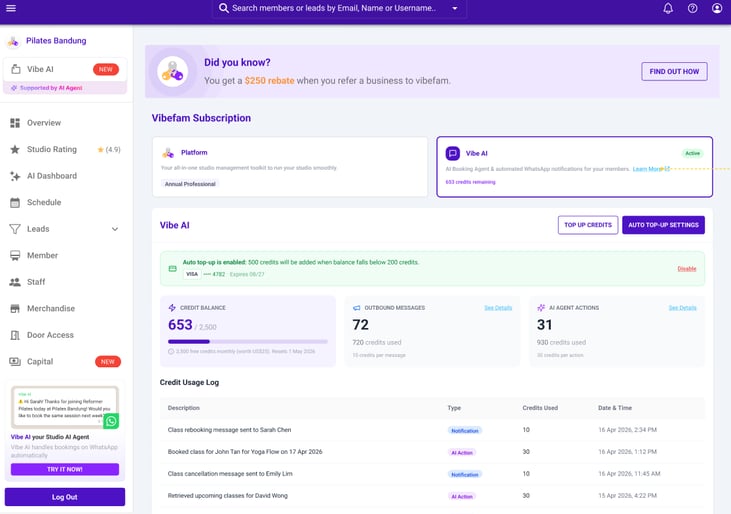
Auto top-up enabled — credits will top up automatically before you run out.
If a top-up fails
If your card declines, Vibe AI pauses automated services until the issue is resolved. You'll see a clear alert on your dashboard, and you can update your payment method or retry the charge directly from there.
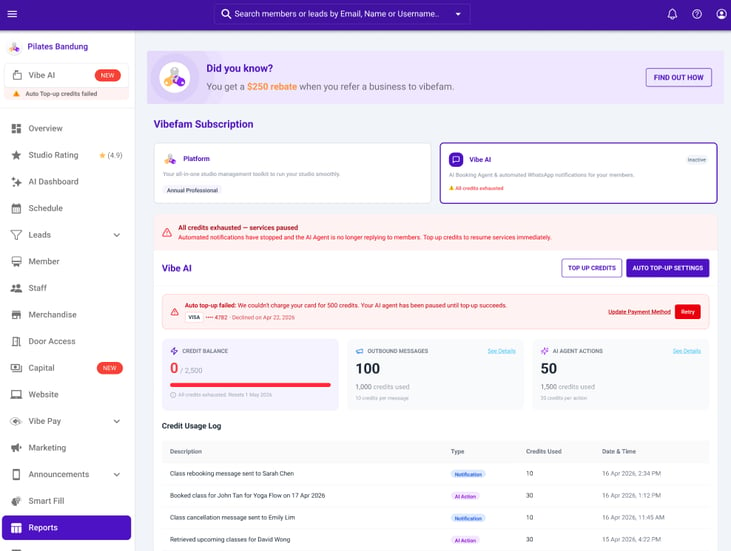
When credits run out and a top-up fails, Vibe AI pauses until the balance is topped up.
What “paused” means
While paused, automated notifications stop sending and the AI Agent no longer replies to members. Nothing is lost — simply top up credits (manually or by fixing the payment method) to resume immediately.
6. Language Support & Member Controls
- Multi-language support: English, Chinese, and Bahasa are explicitly supported. The AI will generally still respond in other languages, but these three are tested and guaranteed.
- Members can unsubscribe from Vibe AI at any time if they no longer want to receive automated WhatsApp messages.
7. Current Limitations
- Only Group Classes are supported — Appointments and Courses are not.
- Only WhatsApp is supported — SMS and iMessage are not available for now.
- Messages send from Vibefam's WhatsApp number, not your studio's own number.
- Staff cannot chat with members through Vibe AI directly (see Reply Restriction, Section 4).
- Vibe AI only supports members with one unique phone number in your Vibefam database. It does not support members who have multiple accounts sharing the same phone number.
Frequently Asked Questions
What is Vibe AI?
Vibe AI is an automated AI Agent that messages your members on WhatsApp to handle booking reminders, cancellations, and rebooking — without any staff involvement.
Do I need to set anything up to start using it?
No. Vibe AI is opt-in by default. Free credits are issued automatically and the AI Agent starts running as soon as your studio is eligible.
Will messages come from my studio's own WhatsApp number?
No — Vibe AI currently sends and receives messages from Vibefam's WhatsApp number, not your studio's own number.
Can my staff jump into a conversation and reply to a member?
Not yet. You can view full conversation history in your Vibe AI inbox, and conversations flagged “Needs Attention” are escalated for your awareness, but direct staff replies from the inbox aren't supported in this release.
Does Vibe AI work for private appointments or courses?
Not yet. The initial release only supports Group Classes. Appointments and Courses are planned for a future phase.
What languages does Vibe AI support?
English, Chinese, and Bahasa are explicitly supported and tested. The AI may still understand other languages, but accuracy isn't guaranteed outside these three.
What can a member actually do by replying to a Vibe AI message?
They can browse group classes, book a class, cancel an existing booking, see their upcoming classes, and check their package details — all through WhatsApp replies.
How much does Vibe AI cost?
Vibe AI runs on credits: 10 credits per automated message (~US$0.10) and 30 credits per AI Agent action like a booking or cancellation (~US$0.30). 1 credit is worth about US$0.01.
Do I get free credits every month?
Yes. Every studio receives free monthly credits sized to fit your studio's typical usage, so the value is comparable across studios of different sizes. New studios start with a flat introductory amount.
What happens when I run out of credits?
Automated messages stop sending and the AI Agent stops replying to members until your balance is topped up — either manually or via auto top-up. Nothing is lost; service resumes as soon as credits are added.
How do I top up manually?
Go to your profile → click on Subscriptions → Select Vibe AI → Top Up Credits, enter the number of credits you want, and confirm. The amount is charged to the card on file for your subscription.
How does auto top-up work?
Go to your profile → click on Subscriptions → Select Vibe AI → Auto Top-Up Settings, set a top-up amount and the balance threshold that should trigger it, then activate. Whenever your balance drops below that threshold, the top-up amount is charged automatically.
What happens if my card is declined during auto top-up?
Vibe AI pauses automated services and shows an alert on your dashboard. You can update your payment method or retry the charge directly from the alert to resume service.
Can a member stop receiving Vibe AI messages?
Yes, members can unsubscribe from Vibe AI at any time if they no longer want automated WhatsApp messages.
Is there a risk of double-booking or policy violations with an AI handling this?
No — cancellation fees, booking limits, and package rules are automatically enforced by the AI Agent, the same way they would be enforced by staff.
📩 Need help? Visit our Help Centre or contact our support team anytime.