
Navigate to Staff in the main menu.
Set up staff payroll
Vibefam calculates staff payroll for you, so you don't have to tabulate it by hand.
In the staff list, click the settings icon on the right of a staff member's row to configure their payroll.
Studios on the Professional plan can access all payroll systems. On other plans, you can still use the payroll system on the Flat rate.
Start with a base system
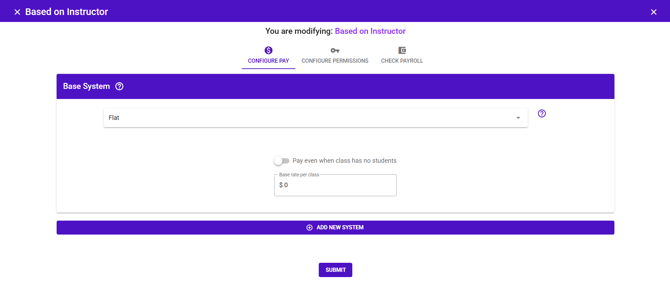
A base system is the payroll structure that applies to every class the instructor teaches.
- If your instructor is paid one rate for all sessions, a base system is all you need.
- Example: Coach Gary is paid $100 for every class he teaches.
Add variability where you need it
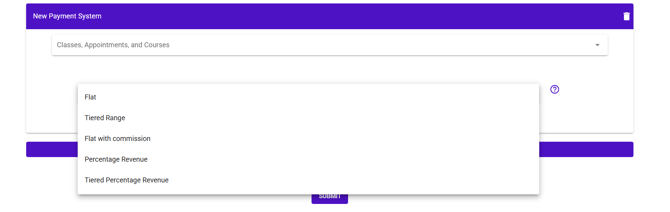
To pay a different rate for certain sessions, click Add New System to add another layer.
- Example: a special rate for Coach Gary's personal training sessions, on top of his base class rate.
Each system applies to a chosen set of Classes, Appointments, and Courses, so you can mix structures for the same instructor.
The five payroll systems
There are five system types, fully customisable on the Professional plan. The right one depends on whether you want to pay a fixed amount or a share of revenue, and whether pay should rise with attendance.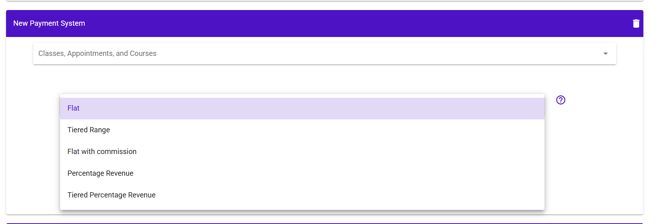
-
Flat — a fixed amount per session, regardless of attendance. The simplest option.
- Example: $100 for every class taught.
- Best for: predictable costs, or instructors on a set rate.
- Tiered Range — a fixed amount that steps up in bands as attendance grows.
- Example: 1–3 students → $30, 4–7 students → $50, 8+ students → $80.
- Best for: encouraging instructors to fill classes. Note the incentive is "lumpy" — once an instructor reaches a band, there's no gain until the next band begins.
- Flat with commission — a base amount, plus a per-head bonus above a threshold.
- Example: $50 for up to 5 students, then $10 for each additional student. A class of 7 pays $70.
- Best for: a smoother incentive than Tiered Range — every extra attendee adds pay, so instructors are motivated to chase each additional sign-up.
- Percentage Revenue — a share of the actual revenue the class earns.
- Example: 50% commission on a class earning $100 pays the instructor $50.
- Best for: protecting your margin when attendance is low, since pay scales with revenue rather than being fixed. A good fit for newer studios or tighter cash flow.
- Tiered Percentage Revenue — like Tiered Range, but each band pays a percentage of revenue instead of a fixed amount.
- Example: 1–3 students → 20%, 4–7 students → 30%, 8+ students → 50%.
- Best for: rewarding attendance while keeping your risk tied to revenue rather than absolute figures.
Attendance-based systems count actual attendance. Make sure your instructors or reception are checking members in, or the calculation won't reflect who really showed up.
We've written a fuller guide with worked examples of each structure: Different ways to pay your freelance instructors.
Check and export
- Click Check Payroll to tabulate an instructor's pay.
- Download the report as a CSV to review or share it.